> ## Documentation Index
> Fetch the complete documentation index at: https://craft-support.mintlify.site/llms.txt
> Use this file to discover all available pages before exploring further.
# Billing
> Manage your Craft subscription, payment details, and invoices.
How you manage billing depends on where you subscribed to Craft. There are three ways to subscribe, and each one is managed in a different place.
## Where did you subscribe?
| You subscribed through | Who handles billing | Where to manage it |
| ------------------------------------------------------ | ------------------- | ------------------------------------------------------------- |
| **Directly from Craft** (in the app or on our website) | Craft | In Craft, under **Settings → My Subscription** |
| **App Store** (iPhone, iPad, or Mac) | Apple | Your Apple Account subscription settings |
| **Setapp** | Setapp | Your Setapp account at [my.setapp.com](https://my.setapp.com) |
Not sure which one applies to you? Check inside Craft:
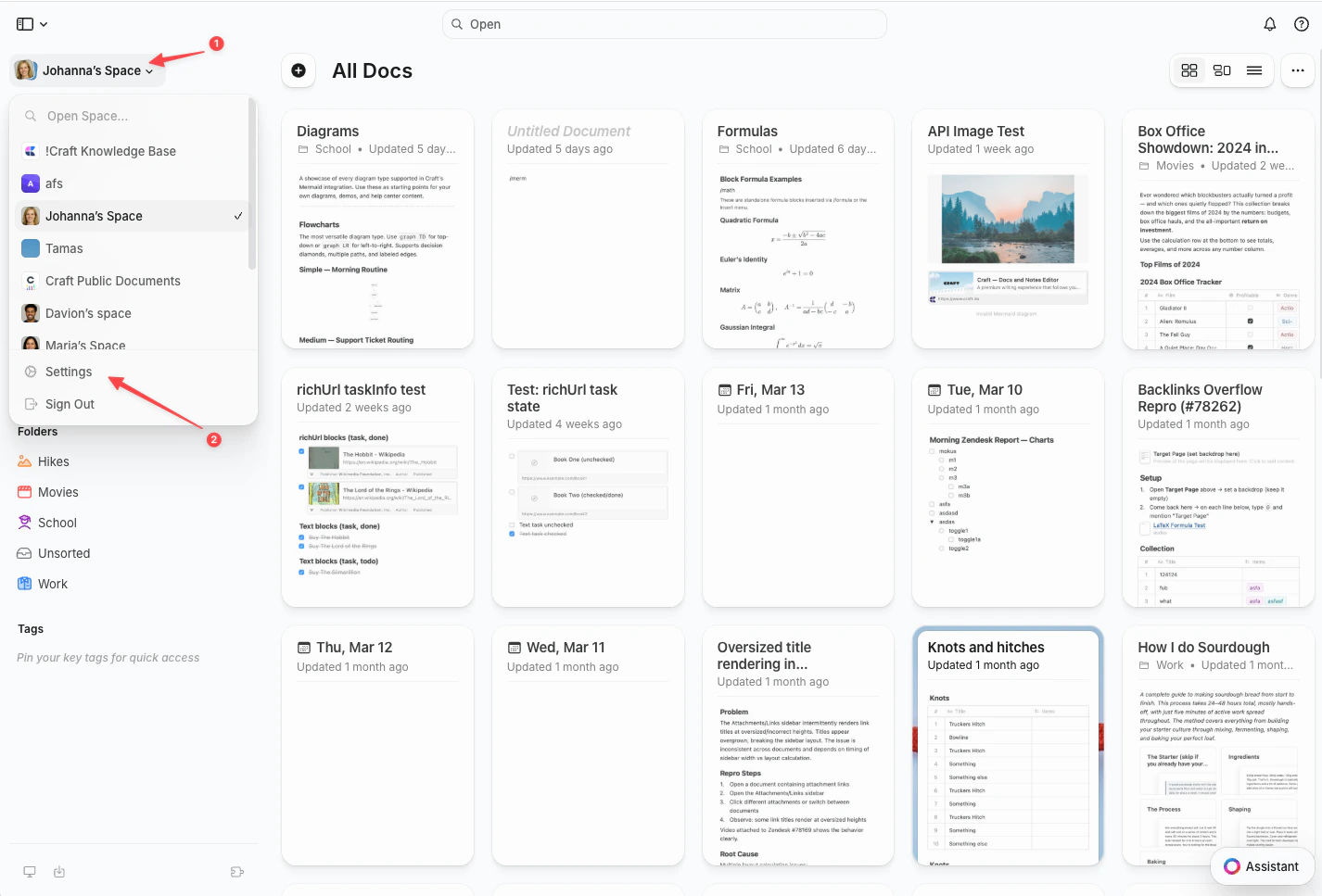
Click the **Space name** at the top of the sidebar to open Settings.
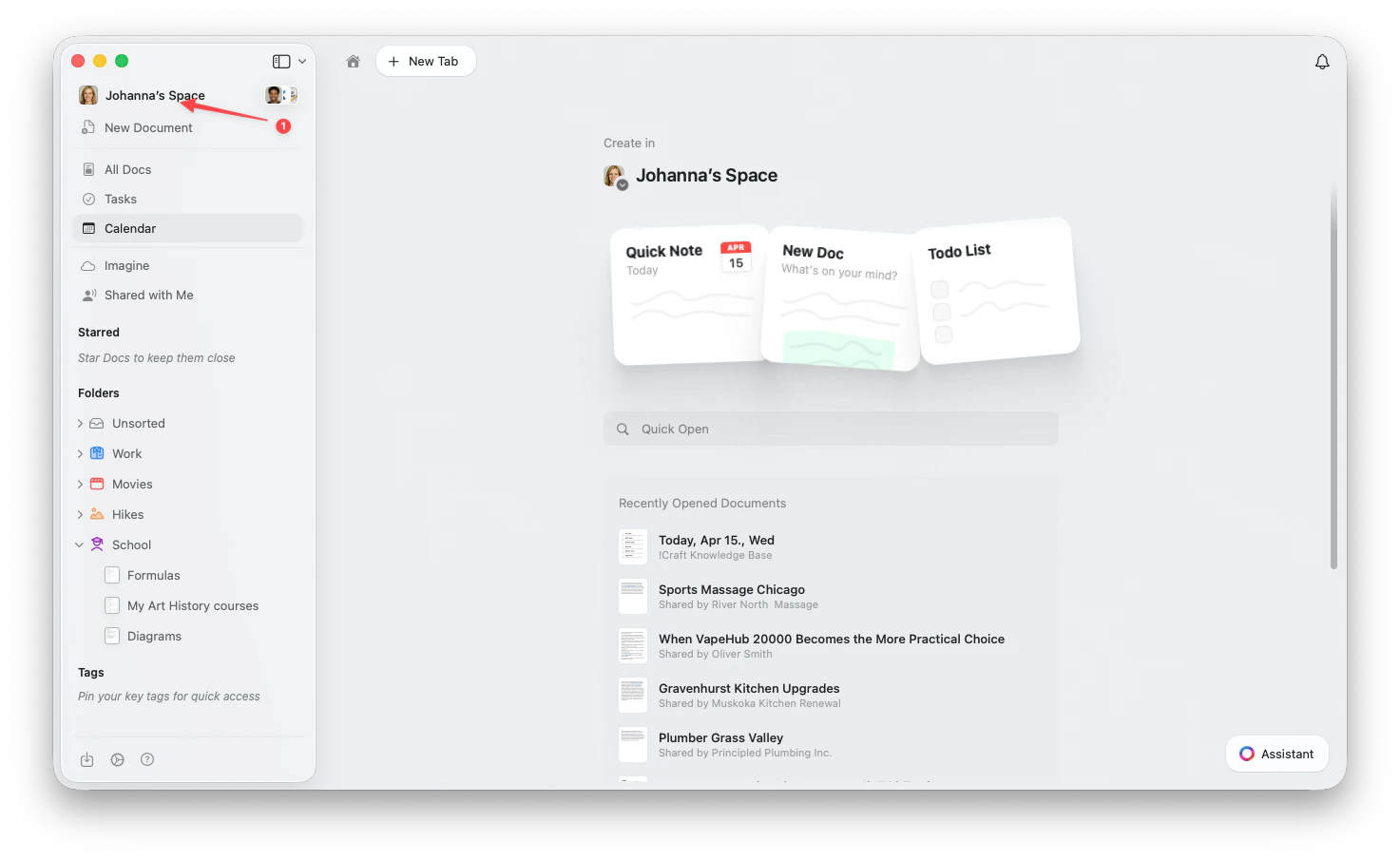 Click the **Space name** in the top-left corner.
Click **Settings** at the bottom of the dropdown.
Click the **Space name** in the top-left corner.
Click **Settings** at the bottom of the dropdown.
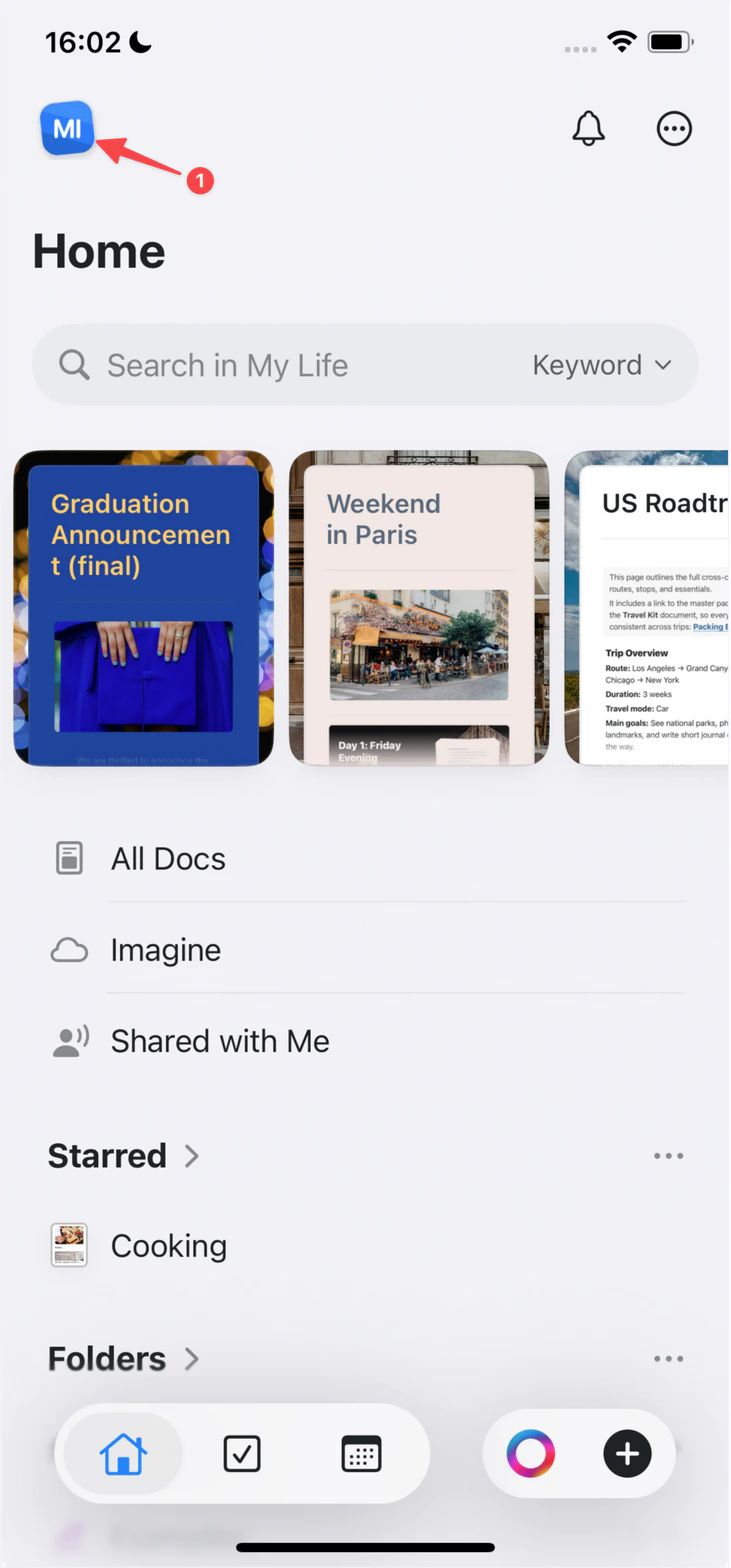
 Tap the **Space icon** in the top-left corner.
 Tap **Settings**.
Tap your **profile picture** in the top-right corner.
Tap **Settings**.
Tap **Settings**.
Tap your **profile picture** in the top-right corner.
Tap **Settings**.
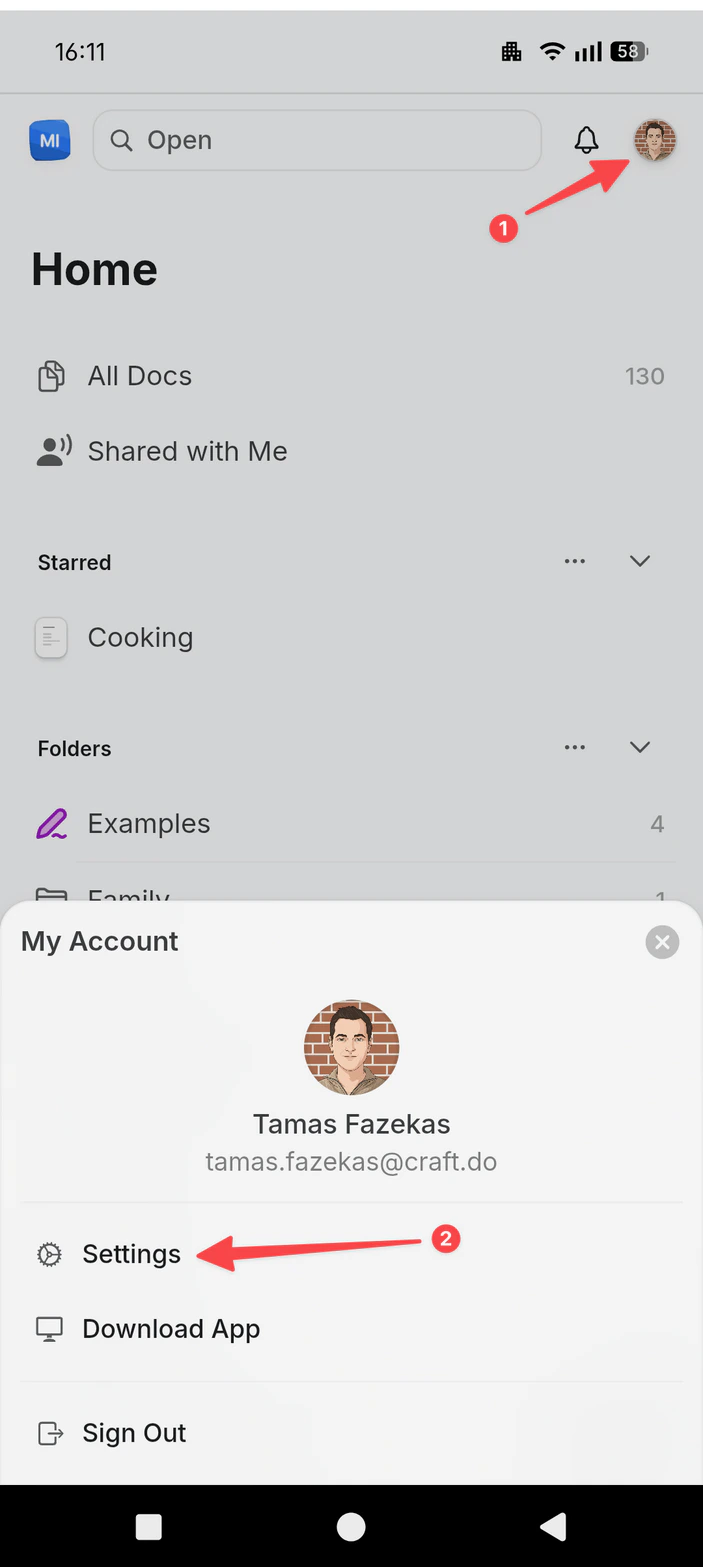 Then select **My Subscription**:
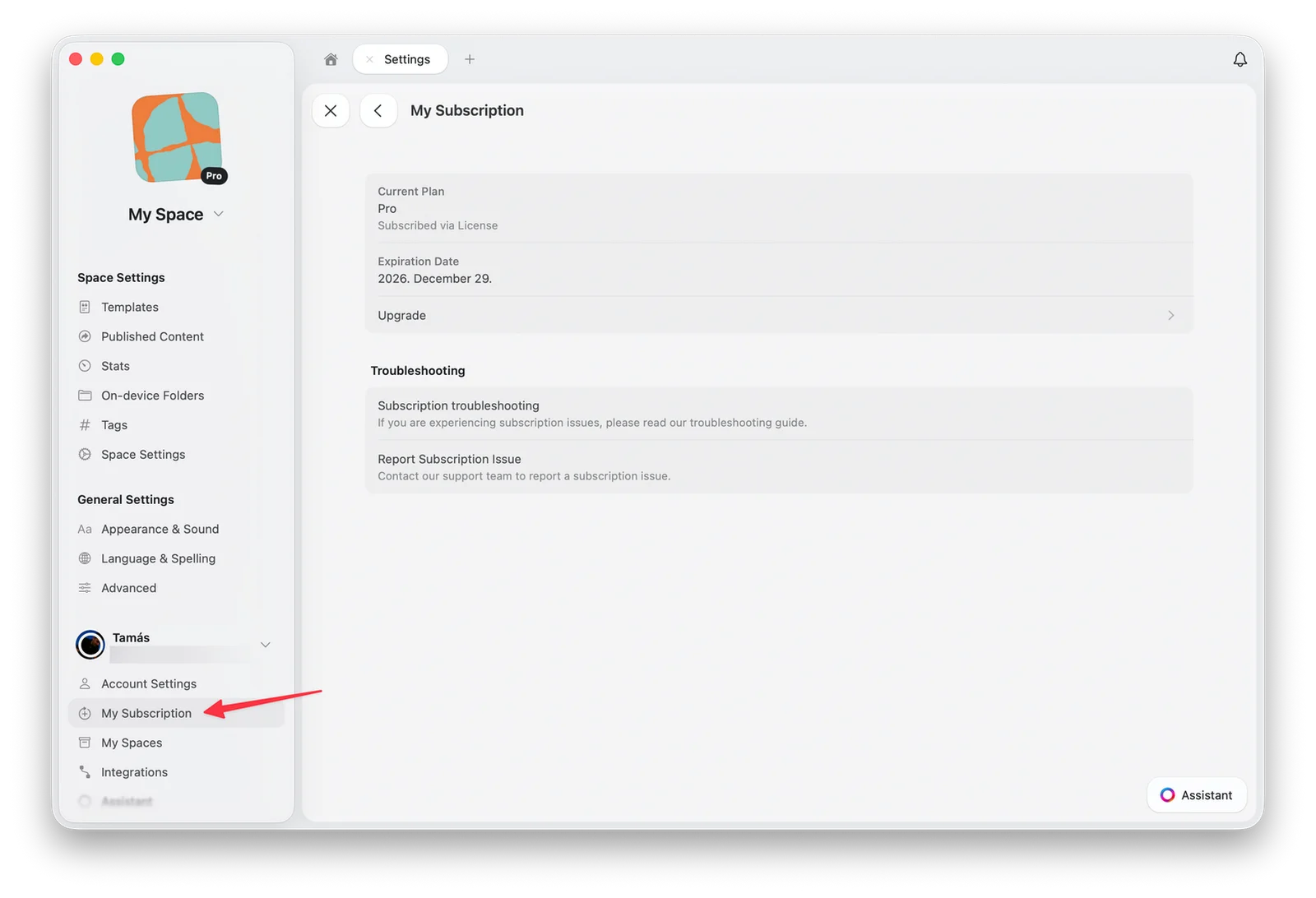 Subscriptions purchased directly from Craft show a **Settings and Billing** button. App Store and Setapp subscriptions point you to Apple or Setapp instead.
## Manage your subscription
Find and download invoices for your subscription
Change the card on file for your subscription
Cancel anytime. Your documents stay safe
Add company details and VAT ID to your invoices
Apply a promotion code to a new subscription
Move your subscription from Apple to Craft directly
## Refunds
Where you subscribed also determines who can issue a refund:
* **Directly from Craft** (in the app or on our website): contact us at [support@craft.do](mailto:support@craft.do) within 14 days of the charge and we'll help.
* **App Store**: Apple handles all App Store payments, so only Apple can issue a refund. [Request a refund from Apple](https://support.apple.com/en-us/HT204084).
* **Setapp**: contact Setapp support through your Setapp account.
## What happens when my subscription ends?
If your subscription expires or you cancel it, your content stays safe. Your account moves to the free plan, and the free plan's limits apply.
### Your content is not deleted
All your documents, spaces, and uploaded content remain in your account. Craft never deletes your content or locks you out when a subscription ends.
### Free plan limits apply
* You can continue viewing and editing your existing documents
* Your space is limited to **1,500 content blocks** and **1 GB of storage**
* Version history is kept for **7 days**
* Premium features such as custom domains and advanced share analytics are no longer available
### Subscribing again
You can resubscribe at any time. All your content is intact, and every feature is available again as soon as your subscription is active.
## Troubleshooting
If you subscribed and still don't see your paid features in one or more of the Craft apps:
* Make sure you are signed in with the same account you used to subscribe, using the same login method (for example, Email vs Sign in with Apple)
* Apple may have assigned a *Private Relay* email to your Craft account if you had [Hide My Email](https://support.apple.com/en-us/HT210425) enabled when you first created your Craft account
* **Tip**: To check which email is assigned to your Craft account, go to **Settings → My Account** in any of the Craft apps
* Paid features are only available in spaces you own. If you're in a shared space whose owner does not have a paid subscription, your paid features won't be enabled there
If none of the above helps and you have a successful charge for a subscription, contact us at [support@craft.do](mailto:support@craft.do).
In Craft on your Apple device, open your subscription settings and use the **Restore Purchase** button:
* **macOS**: Go to **Team Settings → Current Plan** and select **Restore Purchase**
* **iOS**: Go to **Team Settings → Manage Team → Current Plan** and select **Restore Purchase**
If that doesn't help, contact us at [support@craft.do](mailto:support@craft.do).
If you purchased your App Store subscription on the same device, you can transfer it to the current account using the **Restore Purchase** button (see above). Craft also supports Family Sharing for App Store subscriptions.
If you subscribed directly from Craft with the wrong account, contact us at [support@craft.do](mailto:support@craft.do) within 14 days of the transaction. We can process a full refund and cancellation, and you can then subscribe again with the correct account.
Craft works with trusted payment partners to process subscriptions purchased directly from us, in the app or on our website. Depending on when you subscribed, your card statement and receipt emails may show **Stripe** or **Paddle** alongside Craft. These charges are legitimate, and your subscription is still managed inside Craft under **Settings → My Subscription**.
If you see a charge you don't recognize at all, contact us at [support@craft.do](mailto:support@craft.do) and we'll check it for you.
Double-check your email's spam or junk folder, especially if you applied with your school email. If you applied and didn't get any response for two weeks, contact us at [support@craft.do](mailto:support@craft.do) with your full name and the email address you used to apply. We'll be happy to check the status of your application.
If you currently have an App Store subscription, only Apple can refund it. Here's how to request a refund: [https://support.apple.com/en-us/HT204084](https://support.apple.com/en-us/HT204084)
If you subscribed directly from Craft, contact us at [support@craft.do](mailto:support@craft.do) and we'll find the best solution for you.
For general troubleshooting, sync, or platform-specific issues, see the [Troubleshooting Guide](/docs/introduction/troubleshooting).
Subscriptions purchased directly from Craft show a **Settings and Billing** button. App Store and Setapp subscriptions point you to Apple or Setapp instead.
## Manage your subscription
Find and download invoices for your subscription
Change the card on file for your subscription
Cancel anytime. Your documents stay safe
Add company details and VAT ID to your invoices
Apply a promotion code to a new subscription
Move your subscription from Apple to Craft directly
## Refunds
Where you subscribed also determines who can issue a refund:
* **Directly from Craft** (in the app or on our website): contact us at [support@craft.do](mailto:support@craft.do) within 14 days of the charge and we'll help.
* **App Store**: Apple handles all App Store payments, so only Apple can issue a refund. [Request a refund from Apple](https://support.apple.com/en-us/HT204084).
* **Setapp**: contact Setapp support through your Setapp account.
## What happens when my subscription ends?
If your subscription expires or you cancel it, your content stays safe. Your account moves to the free plan, and the free plan's limits apply.
### Your content is not deleted
All your documents, spaces, and uploaded content remain in your account. Craft never deletes your content or locks you out when a subscription ends.
### Free plan limits apply
* You can continue viewing and editing your existing documents
* Your space is limited to **1,500 content blocks** and **1 GB of storage**
* Version history is kept for **7 days**
* Premium features such as custom domains and advanced share analytics are no longer available
### Subscribing again
You can resubscribe at any time. All your content is intact, and every feature is available again as soon as your subscription is active.
## Troubleshooting
If you subscribed and still don't see your paid features in one or more of the Craft apps:
* Make sure you are signed in with the same account you used to subscribe, using the same login method (for example, Email vs Sign in with Apple)
* Apple may have assigned a *Private Relay* email to your Craft account if you had [Hide My Email](https://support.apple.com/en-us/HT210425) enabled when you first created your Craft account
* **Tip**: To check which email is assigned to your Craft account, go to **Settings → My Account** in any of the Craft apps
* Paid features are only available in spaces you own. If you're in a shared space whose owner does not have a paid subscription, your paid features won't be enabled there
If none of the above helps and you have a successful charge for a subscription, contact us at [support@craft.do](mailto:support@craft.do).
In Craft on your Apple device, open your subscription settings and use the **Restore Purchase** button:
* **macOS**: Go to **Team Settings → Current Plan** and select **Restore Purchase**
* **iOS**: Go to **Team Settings → Manage Team → Current Plan** and select **Restore Purchase**
If that doesn't help, contact us at [support@craft.do](mailto:support@craft.do).
If you purchased your App Store subscription on the same device, you can transfer it to the current account using the **Restore Purchase** button (see above). Craft also supports Family Sharing for App Store subscriptions.
If you subscribed directly from Craft with the wrong account, contact us at [support@craft.do](mailto:support@craft.do) within 14 days of the transaction. We can process a full refund and cancellation, and you can then subscribe again with the correct account.
Craft works with trusted payment partners to process subscriptions purchased directly from us, in the app or on our website. Depending on when you subscribed, your card statement and receipt emails may show **Stripe** or **Paddle** alongside Craft. These charges are legitimate, and your subscription is still managed inside Craft under **Settings → My Subscription**.
If you see a charge you don't recognize at all, contact us at [support@craft.do](mailto:support@craft.do) and we'll check it for you.
Double-check your email's spam or junk folder, especially if you applied with your school email. If you applied and didn't get any response for two weeks, contact us at [support@craft.do](mailto:support@craft.do) with your full name and the email address you used to apply. We'll be happy to check the status of your application.
If you currently have an App Store subscription, only Apple can refund it. Here's how to request a refund: [https://support.apple.com/en-us/HT204084](https://support.apple.com/en-us/HT204084)
If you subscribed directly from Craft, contact us at [support@craft.do](mailto:support@craft.do) and we'll find the best solution for you.
For general troubleshooting, sync, or platform-specific issues, see the [Troubleshooting Guide](/docs/introduction/troubleshooting).