> ## Documentation Index
> Fetch the complete documentation index at: https://craft-support.mintlify.site/llms.txt
> Use this file to discover all available pages before exploring further.
# Payment Methods
> Understand the different payment methods available for Craft subscriptions.
Craft offers multiple ways to subscribe, depending on how and where you access the service. Understanding which payment method you're using will help you manage your subscription more effectively.
## Available Payment Methods
### Stripe (Web Subscriptions)
**Stripe** is our primary payment processor for new subscriptions purchased through the Craft website.
**How to recognize:** You subscribed through [craft.do](https://craft.do) or [docs.craft.do](https://docs.craft.do) using a credit/debit card, PayPal, or other local payment methods.
**Features:**
* Localized pricing in your local currency
* Automatic tax calculation based on your location
* Multiple payment methods supported (credit cards, digital wallets)
* Manage your subscription directly from [docs.craft.do](https://docs.craft.do)
**Managing your subscription:**
* Update payment methods through the Stripe billing portal
* Cancel or modify your plan at any time
* Add VAT information to your invoices
* View billing history and download receipts
[Learn how to update payment method →](/en/account-and-subscription/billing/update-payment-method)
### App Store (iOS/Mac)
**App Store** subscriptions are purchased through Apple on iPhone, iPad, or Mac devices.
**How to recognize:** You subscribed through the Craft app on your Apple device, and your subscription is managed through your Apple ID.
**Features:**
* Billed through your Apple ID
* All subscription management handled by Apple
* Supports Family Sharing
* Works across all your Apple devices
**Managing your subscription:**
* All billing is managed through Apple's system
* Cancel or modify through Apple's Subscription Settings
* Refunds must be requested from Apple
[Learn how to cancel App Store subscription →](https://support.apple.com/en-us/HT202039)
### Paddle (Legacy - Existing Subscribers Only)
**Paddle** is our previous payment processor. We no longer offer new Paddle subscriptions, but existing Paddle subscribers can continue to use their current subscriptions.
**How to recognize:** You subscribed through the Craft website before we migrated to Stripe.
**Features:**
* Available only to existing subscribers
* Manage through Paddle's billing system
* Cannot create new Paddle subscriptions
* Existing subscriptions continue to work normally
**Managing your subscription:**
* Access your Paddle account through the billing portal
* Add VAT information to receipts
* Cancel or modify through the Paddle system
**Migrating to Stripe:** At this time, automatic migration from Paddle to Stripe is not available. Your existing Paddle subscription will continue to work. If you need to make changes, please contact support at [support@craft.do](mailto:support@craft.do).
[Learn how to add VAT to Paddle receipts →](/en/account-and-subscription/billing/vat-information)
### Setapp
**Setapp** is a subscription service that provides access to multiple Mac and iOS apps, including Craft.
**How to recognize:** You access Craft through your Setapp subscription.
**Features:**
* Craft access included with Setapp membership
* Billing managed entirely through Setapp
* No separate Craft billing
[Learn more about Setapp →](/en/account-and-subscription/subscription-plans/setapp)
## Which Payment Method Am I Using?
To check which payment method you're using:
Click the **Space name** at the top of the sidebar to open Settings.
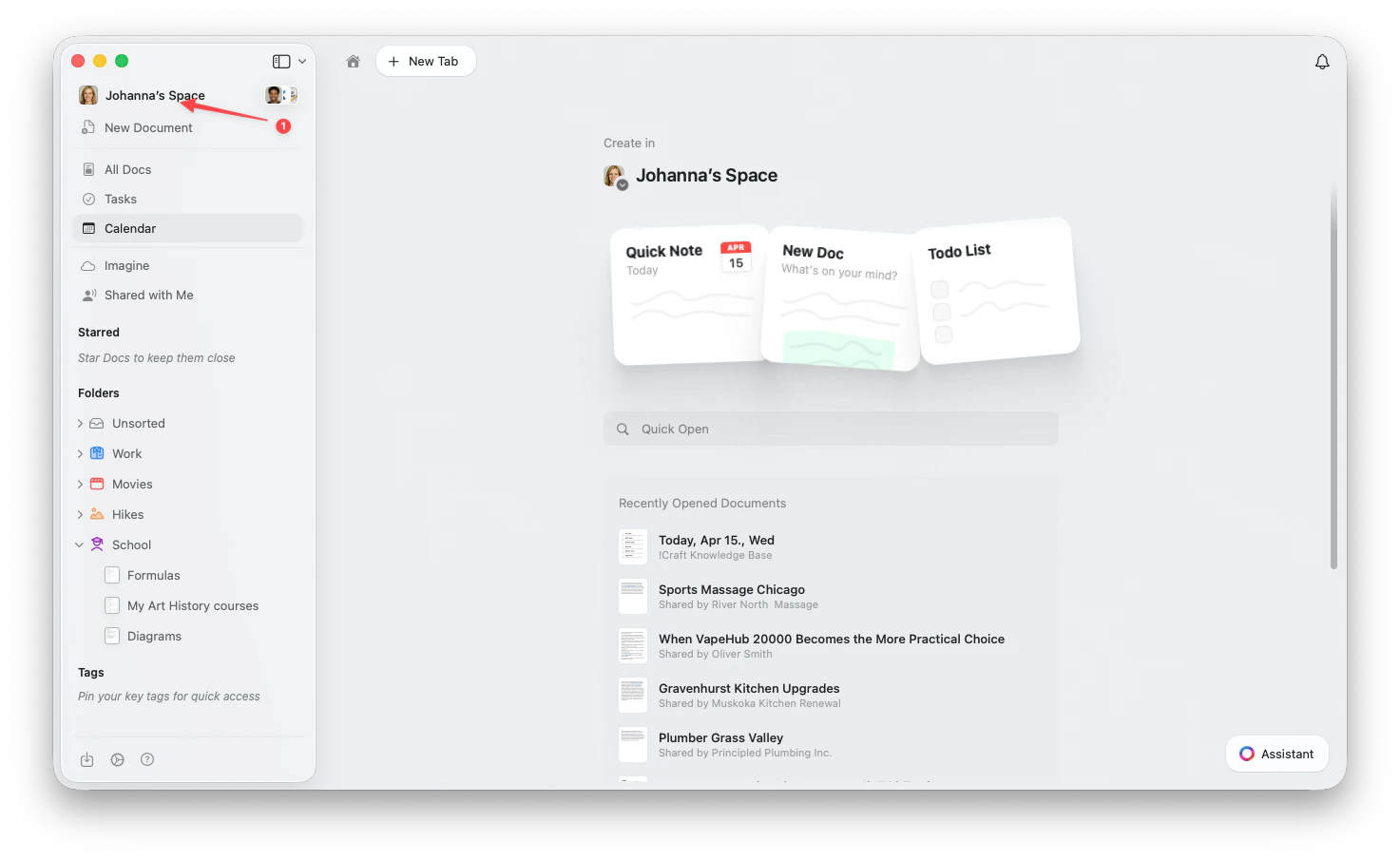 Click the **Space name** in the top-left corner.
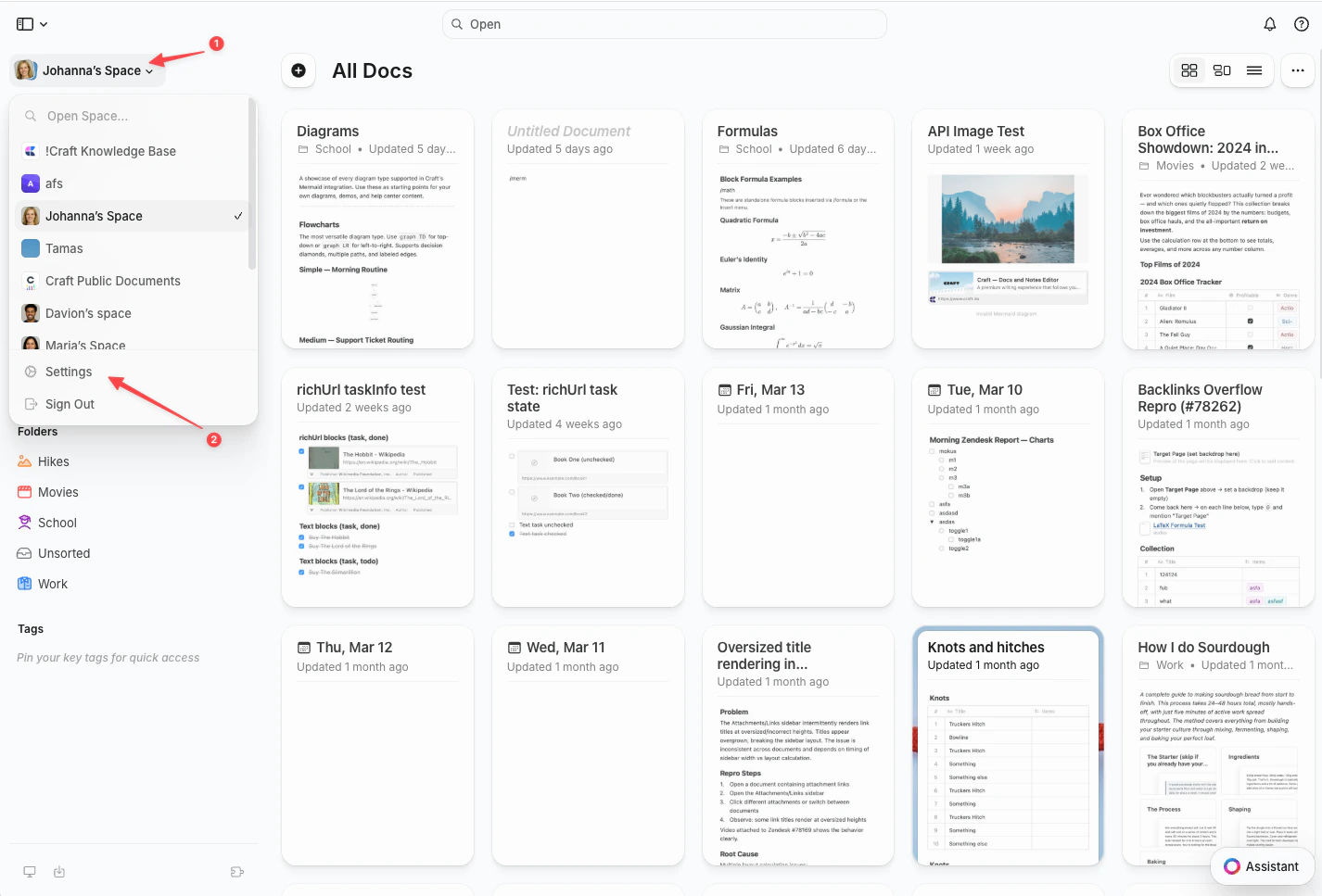
Click **Settings** at the bottom of the dropdown.
Click the **Space name** in the top-left corner.
Click **Settings** at the bottom of the dropdown.
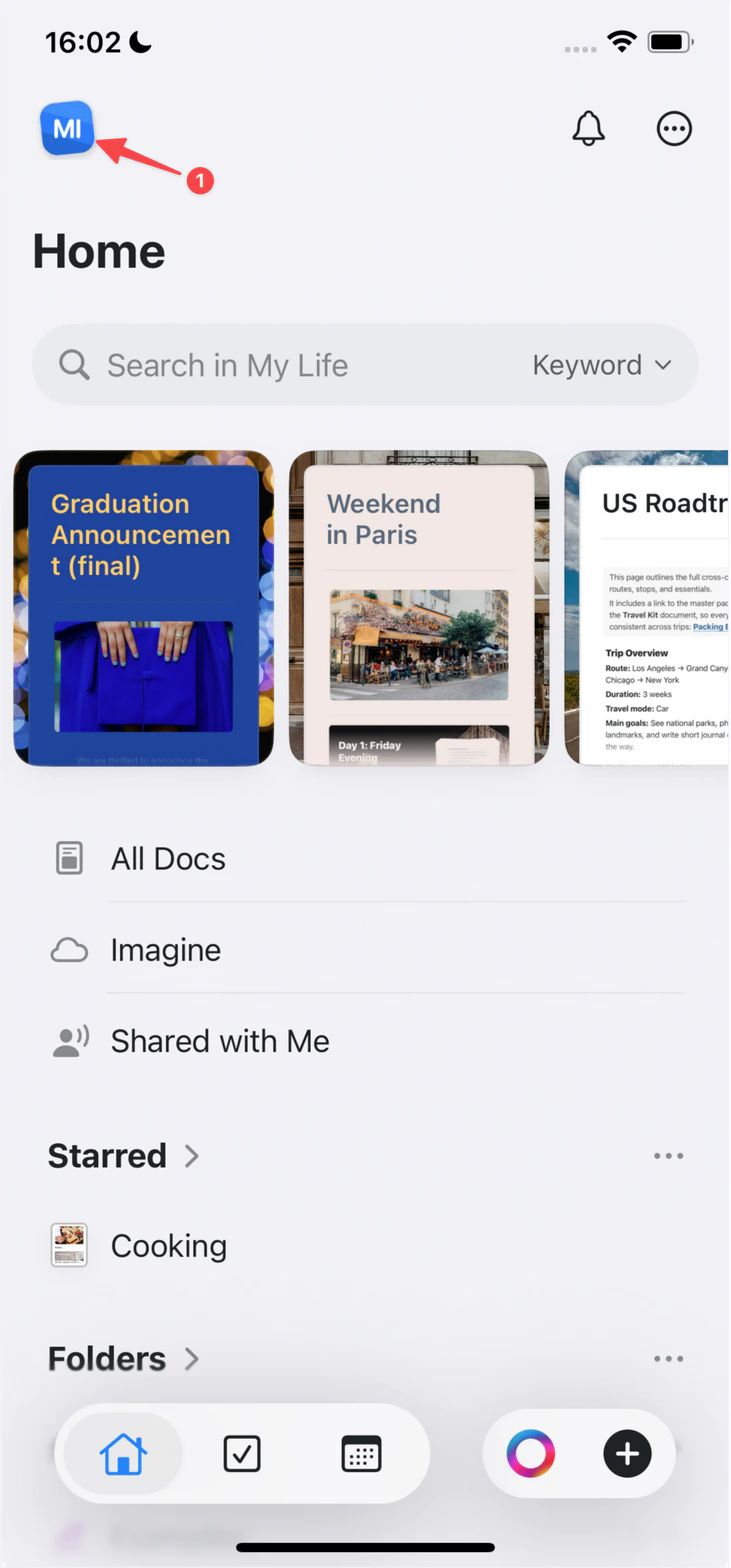
 Tap the **Space icon** in the top-left corner.
 Tap **Settings**.
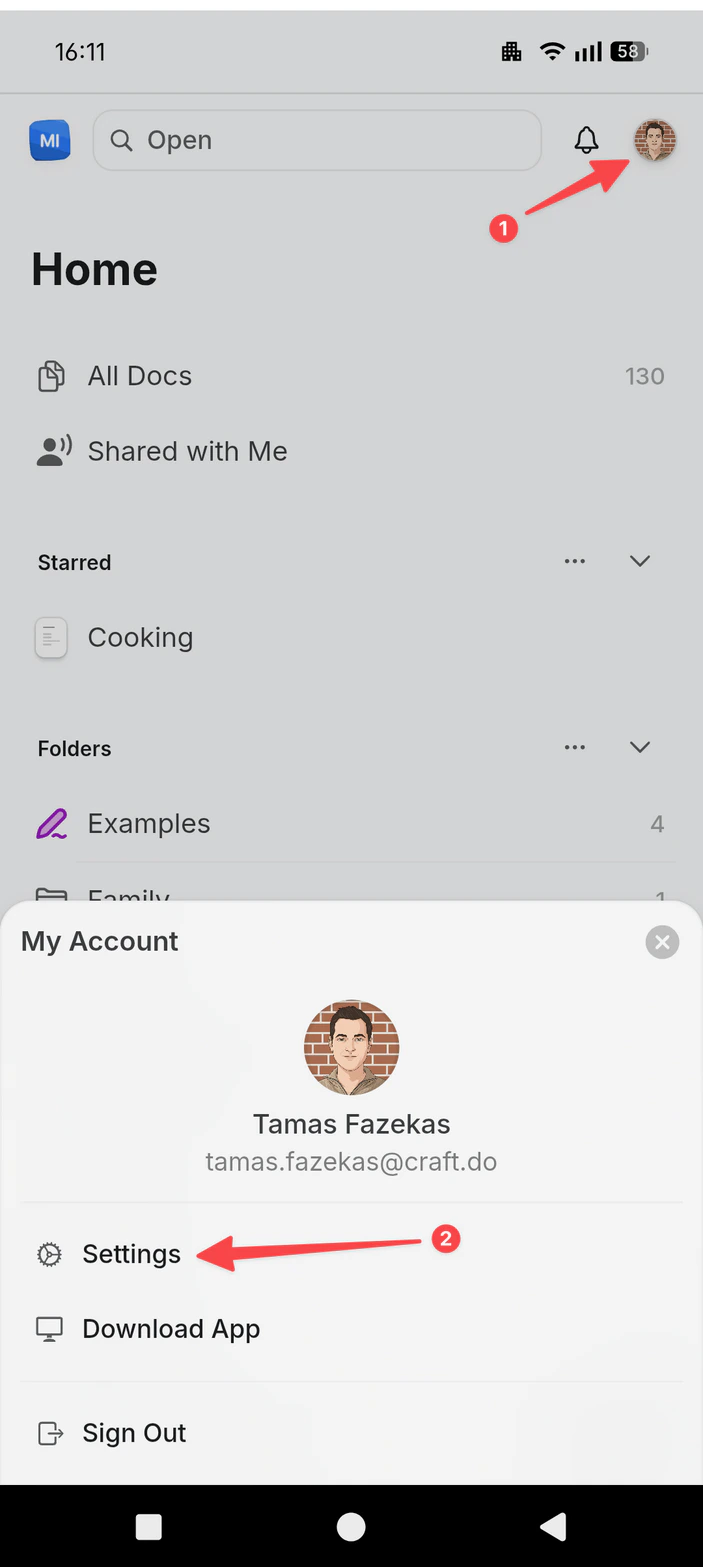
Tap your **profile picture** in the top-right corner.
Tap **Settings**.
Tap **Settings**.
Tap your **profile picture** in the top-right corner.
Tap **Settings**.
 Navigate to **My Subscription** or **Team Settings**
Check your subscription details:
* **Stripe**: Shows "Billing & Subscription" button
* **App Store**: Shows "Manage Subscription" with Apple link
* **Paddle**: Shows billing portal with Paddle branding
* **Setapp**: Shows Setapp subscription details
## Switching Payment Methods
### From App Store to Web (Stripe)
You cannot directly transfer an App Store subscription to Stripe. You'll need to:
1. Cancel your App Store subscription
2. Wait for it to expire
3. Subscribe again through [craft.do](https://craft.do)
Apple handles App Store refunds. [Request a refund from Apple →](https://support.apple.com/en-us/HT204084)
### From Paddle to Stripe
Automatic migration from Paddle to Stripe is not currently available. Your Paddle subscription will continue to work. For assistance with your subscription, contact [support@craft.do](mailto:support@craft.do).
## Localized Pricing
**Stripe subscriptions** support localized pricing:
* Prices are displayed in your local currency
* Pricing reflects local purchasing power and market conditions
* Automatic tax calculation (including VAT where applicable)
* Prices may vary by country
**App Store subscriptions** use Apple's regional pricing.
**Paddle subscriptions** (legacy) have fixed pricing based on original subscription terms.
## Need Help?
If you have questions about your payment method or need assistance with billing, contact us at [support@craft.do](mailto:support@craft.do).
## Related Articles
Change your payment details for your subscription
Cancel your Craft subscription
Compare Craft's subscription tiers
Add VAT details to your receipts
Navigate to **My Subscription** or **Team Settings**
Check your subscription details:
* **Stripe**: Shows "Billing & Subscription" button
* **App Store**: Shows "Manage Subscription" with Apple link
* **Paddle**: Shows billing portal with Paddle branding
* **Setapp**: Shows Setapp subscription details
## Switching Payment Methods
### From App Store to Web (Stripe)
You cannot directly transfer an App Store subscription to Stripe. You'll need to:
1. Cancel your App Store subscription
2. Wait for it to expire
3. Subscribe again through [craft.do](https://craft.do)
Apple handles App Store refunds. [Request a refund from Apple →](https://support.apple.com/en-us/HT204084)
### From Paddle to Stripe
Automatic migration from Paddle to Stripe is not currently available. Your Paddle subscription will continue to work. For assistance with your subscription, contact [support@craft.do](mailto:support@craft.do).
## Localized Pricing
**Stripe subscriptions** support localized pricing:
* Prices are displayed in your local currency
* Pricing reflects local purchasing power and market conditions
* Automatic tax calculation (including VAT where applicable)
* Prices may vary by country
**App Store subscriptions** use Apple's regional pricing.
**Paddle subscriptions** (legacy) have fixed pricing based on original subscription terms.
## Need Help?
If you have questions about your payment method or need assistance with billing, contact us at [support@craft.do](mailto:support@craft.do).
## Related Articles
Change your payment details for your subscription
Cancel your Craft subscription
Compare Craft's subscription tiers
Add VAT details to your receipts