> ## Documentation Index
> Fetch the complete documentation index at: https://craft-support.mintlify.site/llms.txt
> Use this file to discover all available pages before exploring further.
# Document Version History
> Learn how Craft automatically backs up your documents and how to restore previous versions.
Craft automatically creates backups of your documents, allowing you to restore previous versions if needed. This feature ensures that you can recover your content in case of accidental changes or deletions.
## How Version History Works
### Automatic Backups Every Hour
* A snapshot of your document is created every **60 minutes** while you're actively making changes
* After you make an edit, the system starts a timer
* If you continue making changes, a snapshot is automatically saved once one hour has passed
* The process then repeats: as long as you keep editing, new snapshots are created every hour
**Example:**
* You update a document at **10:00 AM** → The timer starts
* You continue making changes until **11:00 AM** → A backup is saved
* The timer resets and tracks your changes until **12:00 PM**, when the next backup is saved
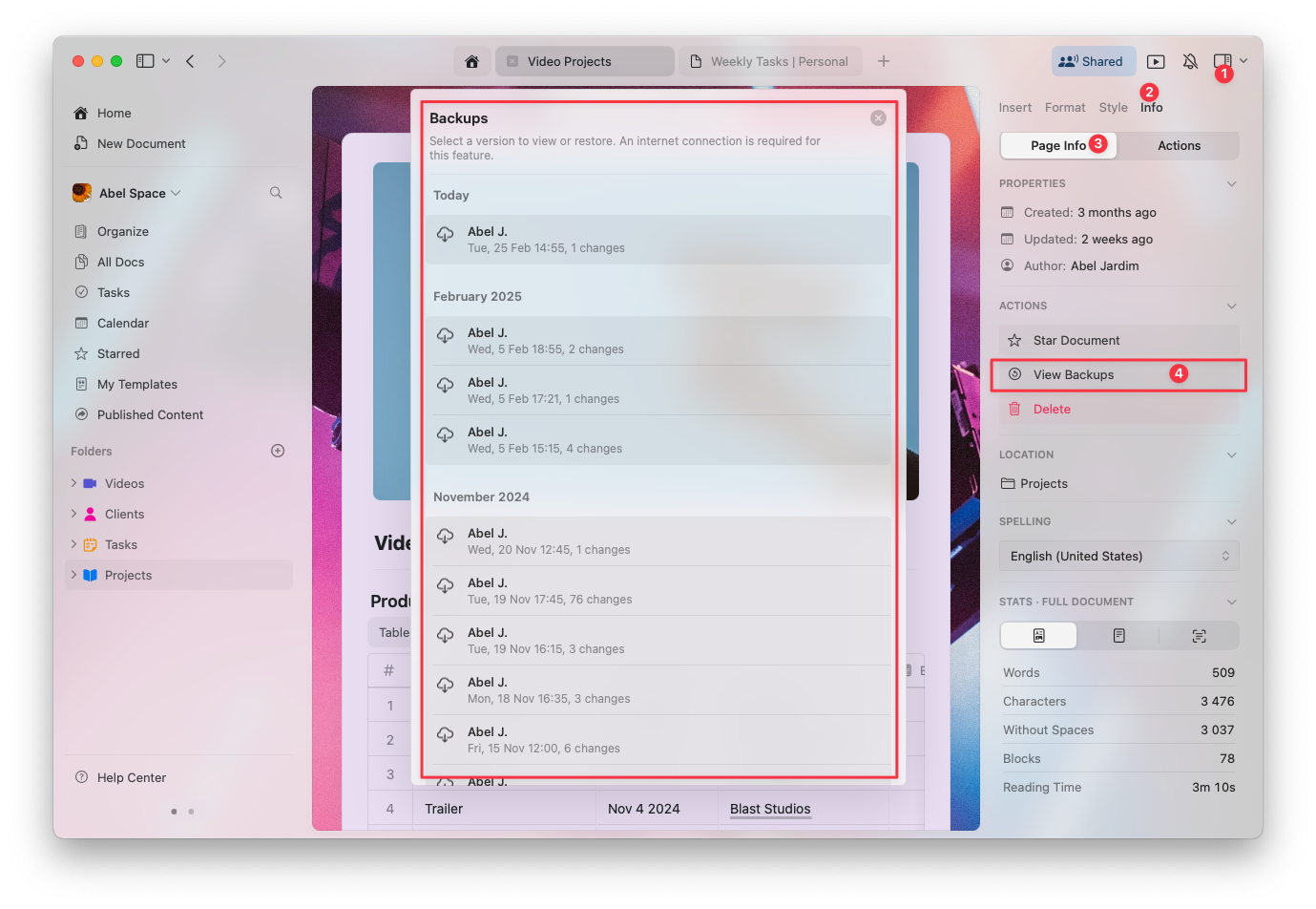
## How to View Document Backups
Open the document you want to review
Click on the **Info** tab in the right sidebar
Select **View Backups** to access the list of saved versions
Choose a backup from the list to preview and restore it if needed
 ## Backup Retention by Plan
The number of days your document versions are available depends on your Craft subscription plan:
| Plan | Version History Retention |
| -------------- | ------------------------- |
| Starter (Free) | 7 days |
| Plus, Family | 30 days |
| Team, Business | 180 days |
After the retention period for your plan, older backups are automatically deleted and no longer accessible.
## Troubleshooting
If you can't see a previous version of your document, see [Troubleshooting Version History](/en/account-and-subscription/storage-and-recovery/version-history-troubleshooting) for common causes and solutions.
## Related Articles
Learn how to recover deleted documents, folders, and pages
Fix issues with document version history
Compare storage limits across plans
## Backup Retention by Plan
The number of days your document versions are available depends on your Craft subscription plan:
| Plan | Version History Retention |
| -------------- | ------------------------- |
| Starter (Free) | 7 days |
| Plus, Family | 30 days |
| Team, Business | 180 days |
After the retention period for your plan, older backups are automatically deleted and no longer accessible.
## Troubleshooting
If you can't see a previous version of your document, see [Troubleshooting Version History](/en/account-and-subscription/storage-and-recovery/version-history-troubleshooting) for common causes and solutions.
## Related Articles
Learn how to recover deleted documents, folders, and pages
Fix issues with document version history
Compare storage limits across plans