> ## Documentation Index
> Fetch the complete documentation index at: https://craft-support.mintlify.site/llms.txt
> Use this file to discover all available pages before exploring further.
# Setapp
> Access Craft through your Setapp subscription with Plus tier features.
If you're using the Setapp version of Craft, you have access to our **Plus Tier** features.
## Using Craft with Setapp
Setapp needs to be running in the background for Craft to launch.
In the Setapp app, scan the QR code to initiate login with Setapp.
In the Setapp app, scan the QR code to initiate login with Setapp.
## What's included with Setapp
Your Setapp subscription grants you access to Plus tier features, including:
* **1TB storage** per space (up to 5 spaces per team)
* **5GB upload limit** per file
* **Advanced Share Analytics**
* **Custom Domains**
* **AI Assistant benefits**, including a monthly AI usage refresh, access to advanced Assistant models, and Bring Your Own Key (BYOK)
Setapp includes Plus tier features for your Craft account, but it does not support inviting members to your team. You can still collaborate with others at the document level.
## Troubleshooting
### Subscription Not Recognized or AUTH Error
If Craft doesn't recognize your Setapp subscription, or you see an error like `AUTH/2/650`:
Make sure you're launching Craft **from the Setapp app**, not from your Applications folder or Dock directly
Ensure Setapp is running in the background — Craft needs it to verify your subscription
If the issue persists, quit both Craft and Setapp completely, then reopen Setapp first, followed by Craft
If you previously installed Craft from the App Store or directly from craft.do, your Mac may be opening that version instead of the Setapp version. Check that you're using the correct copy by looking for the Setapp badge on the app icon.
### "Another Craft is Already Installed" Error
If you see this pop-up after opening the Setapp version on Mac:
Delete the Craft app
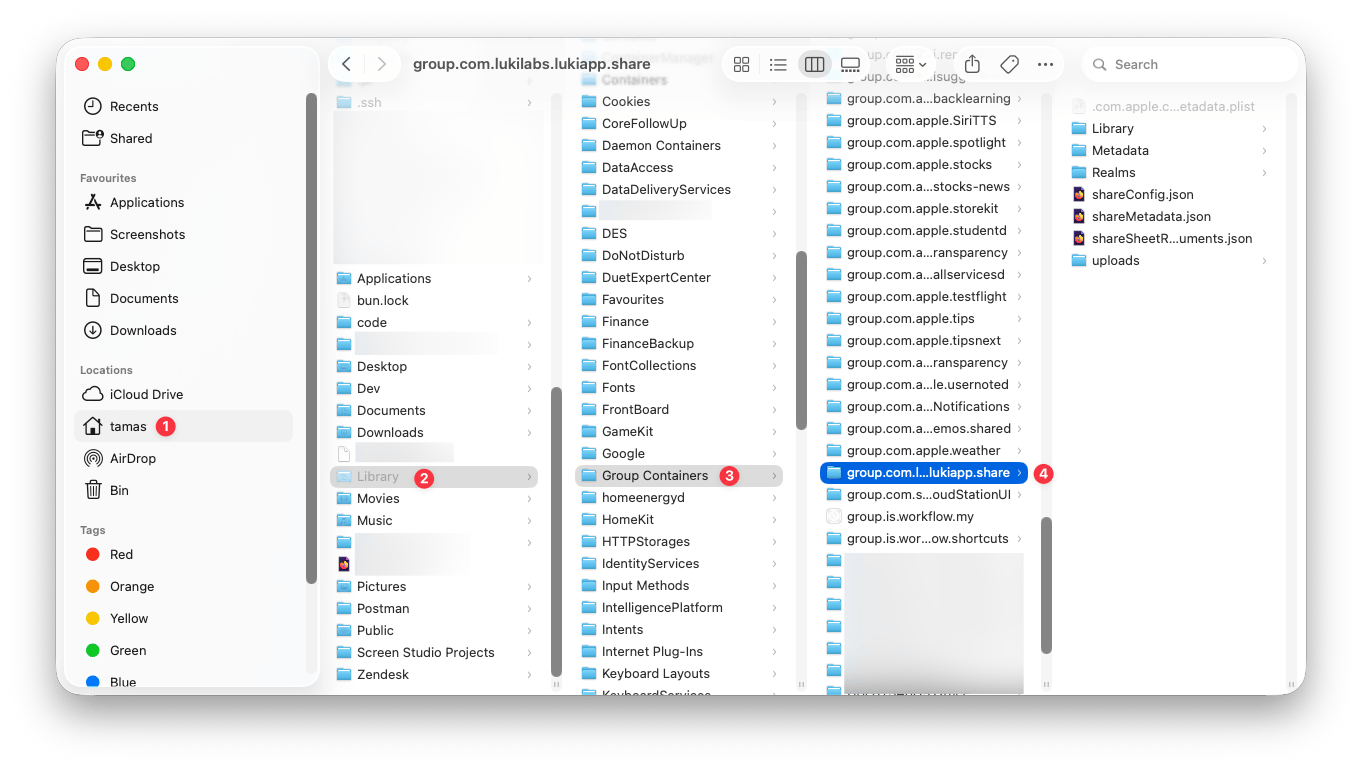
Open Finder and navigate to your home folder
Press `Cmd + Shift + .` to display hidden folders
Delete `~/Library/Group Containers/group.com.lukilabs.lukiapp.share/`
Delete `~/Library/Containers/com.lukilabs.lukiapp`
Download Craft from Setapp again
 ## Switching from Setapp to a Craft subscription
It is not possible to upgrade a team while it is tied to a Setapp subscription.
If you want to subscribe to Plus, Family, Business, or Team directly with Craft, choose one of these options:
[Create a new team](/en/organize-and-find/teams), then subscribe directly through [craft.do/pricing](https://www.craft.do/pricing).
Cancel your Setapp subscription, wait until it fully expires, then subscribe through our website or the App Store.
If you need help creating a new team, switching plans, or understanding what happens to your current setup, [contact our support team](mailto:support@craft.do). We'll help you choose the safest option.
## Moving from Craft Subscription to Setapp
### Same Email for Both Accounts
If your Craft account email matches your Setapp account email:
Download the Setapp version of Craft through Setapp
Sign in with that email
Your existing Craft account will be automatically assigned to Setapp
Your previous content will be visible right away
### Different Emails
If your Craft account has a different email than your Setapp account:
You'll need to migrate content from your Craft account to your Setapp account. It's not possible to merge Craft and Setapp accounts with different email addresses.
You can move content between accounts manually by exporting and importing documents.
## Related Articles
Compare all Craft subscription plans
Monitor your space storage
Export your content from Craft
Learn how teams and spaces work in Craft
Get help choosing the right subscription path
## Switching from Setapp to a Craft subscription
It is not possible to upgrade a team while it is tied to a Setapp subscription.
If you want to subscribe to Plus, Family, Business, or Team directly with Craft, choose one of these options:
[Create a new team](/en/organize-and-find/teams), then subscribe directly through [craft.do/pricing](https://www.craft.do/pricing).
Cancel your Setapp subscription, wait until it fully expires, then subscribe through our website or the App Store.
If you need help creating a new team, switching plans, or understanding what happens to your current setup, [contact our support team](mailto:support@craft.do). We'll help you choose the safest option.
## Moving from Craft Subscription to Setapp
### Same Email for Both Accounts
If your Craft account email matches your Setapp account email:
Download the Setapp version of Craft through Setapp
Sign in with that email
Your existing Craft account will be automatically assigned to Setapp
Your previous content will be visible right away
### Different Emails
If your Craft account has a different email than your Setapp account:
You'll need to migrate content from your Craft account to your Setapp account. It's not possible to merge Craft and Setapp accounts with different email addresses.
You can move content between accounts manually by exporting and importing documents.
## Related Articles
Compare all Craft subscription plans
Monitor your space storage
Export your content from Craft
Learn how teams and spaces work in Craft
Get help choosing the right subscription path