> ## Documentation Index
> Fetch the complete documentation index at: https://craft-support.mintlify.site/llms.txt
> Use this file to discover all available pages before exploring further.
# Choosing AI Models
> Select the right AI model for speed, capability, and AI usage based on your task.
Craft offers several AI models with different strengths. Choosing the right one helps you manage AI usage and match the model to the size and complexity of your task.
## How to switch models
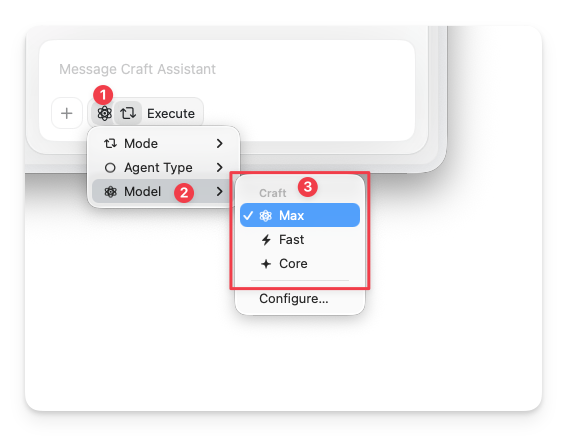
You can change the model at any time from inside the Assistant panel.
Open the Assistant from any document or Space view.
Below the input field, tap the **Assistant button**.
Choose **Model** from the popup, then pick the model you want to use.
 ## Model comparison
| Model | Usage | Best for | Conversations | Editing |
| -------- | ------ | ------------------------------------------------------------ | --------------- | ------- |
| **Max** | High | Complex reasoning, multi-document work, long summaries | Multi-turn | Yes |
| **Fast** | Medium | Space-level questions, deeper analysis, longer conversations | Multi-turn | Yes |
| **Core** | Low | Everyday in-document queries, balanced performance | Single response | No |
The **Local** tier groups several models you can choose between:
| Local model | Conversations | Availability |
| ---------------------- | --------------- | ----------------- |
| Apple Foundation Model | Multi-turn | Mac, iPad, iPhone |
| LLaMa 3.2 | Single response | Mac, iPad, iPhone |
On-device models process everything locally on your device — no data is sent to external servers. They don't count toward your AI usage but are only available at document level.
Apple Foundation Model needs [Apple Intelligence](https://support.apple.com/en-us/111901) turned on, plus a recent iPhone, iPad, or Mac. If you don't see it in the model list, check the requirements below.
## When to choose each model
### Core
The default tier for most everyday tasks. Use for in-document questions, quick summaries, and simple transformations.
* Uses a low amount of AI usage
* Gives a single response per conversation
* Read-only — no document editing
### Local
On-device models that run entirely on your device. No data is sent to external servers.
* On-device models don't count toward your AI usage
* **Apple Foundation Model** supports back-and-forth conversations and runs entirely on-device — a good choice for iterating on a question privately
* **LLaMa 3.2** gives a single response per conversation
* Read-only — no document editing
### Fast
Use for space-level queries and quick edits.
* Good balance of speed and quality
* Supports editing on supported platforms
* Works well for short to medium editing tasks
### Max
Use for complex reasoning and high-quality editing.
* Best output quality for large or structured edits
* Best for advanced multi-document analysis
* Supports editing on supported platforms
## Platform differences
All cloud models (Max, Fast, Core) are available on every platform — macOS, iOS, Windows, and Web.
Local models (Apple Foundation Model, LLaMa 3.2) are available on **Mac, iPad, and iPhone** only. Editing with the Assistant is currently supported on **macOS and iOS** — see [Editing with Craft Assistant](/en/ai-assistant/editing) for details.
## Apple Foundation Model not showing up?
Apple Foundation Model only appears in the model list when your device can run it. If it can't, the model is hidden completely (there's no greyed-out entry), so it's easy to assume something is broken. It shows up automatically once all of these are true:
* You're on an **iPhone, iPad, or Mac** (not Windows or web).
* Your device **supports Apple Intelligence**, and Apple Intelligence is **turned on** in your device settings.
* You're running the **latest iOS, iPadOS, or macOS**.
* Apple Intelligence has **finished downloading**. Right after you enable it, the on-device model downloads in the background, and it stays hidden until that finishes.
## Related Articles
Learn how to start conversations and work with the Assistant
See what editing can do and how modes work
Understand AI usage and top-up options
## Model comparison
| Model | Usage | Best for | Conversations | Editing |
| -------- | ------ | ------------------------------------------------------------ | --------------- | ------- |
| **Max** | High | Complex reasoning, multi-document work, long summaries | Multi-turn | Yes |
| **Fast** | Medium | Space-level questions, deeper analysis, longer conversations | Multi-turn | Yes |
| **Core** | Low | Everyday in-document queries, balanced performance | Single response | No |
The **Local** tier groups several models you can choose between:
| Local model | Conversations | Availability |
| ---------------------- | --------------- | ----------------- |
| Apple Foundation Model | Multi-turn | Mac, iPad, iPhone |
| LLaMa 3.2 | Single response | Mac, iPad, iPhone |
On-device models process everything locally on your device — no data is sent to external servers. They don't count toward your AI usage but are only available at document level.
Apple Foundation Model needs [Apple Intelligence](https://support.apple.com/en-us/111901) turned on, plus a recent iPhone, iPad, or Mac. If you don't see it in the model list, check the requirements below.
## When to choose each model
### Core
The default tier for most everyday tasks. Use for in-document questions, quick summaries, and simple transformations.
* Uses a low amount of AI usage
* Gives a single response per conversation
* Read-only — no document editing
### Local
On-device models that run entirely on your device. No data is sent to external servers.
* On-device models don't count toward your AI usage
* **Apple Foundation Model** supports back-and-forth conversations and runs entirely on-device — a good choice for iterating on a question privately
* **LLaMa 3.2** gives a single response per conversation
* Read-only — no document editing
### Fast
Use for space-level queries and quick edits.
* Good balance of speed and quality
* Supports editing on supported platforms
* Works well for short to medium editing tasks
### Max
Use for complex reasoning and high-quality editing.
* Best output quality for large or structured edits
* Best for advanced multi-document analysis
* Supports editing on supported platforms
## Platform differences
All cloud models (Max, Fast, Core) are available on every platform — macOS, iOS, Windows, and Web.
Local models (Apple Foundation Model, LLaMa 3.2) are available on **Mac, iPad, and iPhone** only. Editing with the Assistant is currently supported on **macOS and iOS** — see [Editing with Craft Assistant](/en/ai-assistant/editing) for details.
## Apple Foundation Model not showing up?
Apple Foundation Model only appears in the model list when your device can run it. If it can't, the model is hidden completely (there's no greyed-out entry), so it's easy to assume something is broken. It shows up automatically once all of these are true:
* You're on an **iPhone, iPad, or Mac** (not Windows or web).
* Your device **supports Apple Intelligence**, and Apple Intelligence is **turned on** in your device settings.
* You're running the **latest iOS, iPadOS, or macOS**.
* Apple Intelligence has **finished downloading**. Right after you enable it, the on-device model downloads in the background, and it stays hidden until that finishes.
## Related Articles
Learn how to start conversations and work with the Assistant
See what editing can do and how modes work
Understand AI usage and top-up options