> ## Documentation Index
> Fetch the complete documentation index at: https://craft-support.mintlify.site/llms.txt
> Use this file to discover all available pages before exploring further.
# Usage & Limits
> Understand your AI usage quota, what's included in your plan, and how to get more when you need it.
Every Craft plan includes an AI usage quota so you can use the Assistant without worrying about per-message costs. On-device models are always free and unlimited. Cloud models (Core, Fast, Max) count toward your quota.
## Usage quota by plan
| Plan | Included usage |
| -------------------- | ------------------------------------------------------------------- |
| **Free** | \~15–25 AI sessions (lifetime) |
| **Plus Monthly** | \~25–50 AI sessions per month |
| **Plus Yearly** | \~250–500 AI sessions per year |
| **Family Monthly** | \~50–100 AI sessions per month (team) + \~25–50 for the owner |
| **Family Yearly** | \~500–1,000 AI sessions per year (team) + \~250–500 for the owner |
| **Team Monthly** | \~150–300 AI sessions per month (team) + \~25–50 for the owner |
| **Team Yearly** | \~1,500–3,000 AI sessions per year (team) + \~250–500 for the owner |
| **Education** | \~15–25 AI sessions (lifetime) |
| **Setapp** | \~15–25 AI sessions per month |
| **On-device models** | Unlimited (always free) |
These are approximate ranges depending on complexity. Max models use your quota faster, while simpler queries with Core stretch it further. Internally, usage is tracked using a credit system. You can view exact amounts in the Usage & Limits screen by tapping the info icon.
## What counts toward usage
Cloud-based models (Core, Fast, Max) count toward your quota. The amount varies by model and task complexity. Max uses the most, Core the least.
On-device models run locally on your Mac, iPad, or iPhone and never count toward your quota.
The more context you give the Assistant (documents, folders, full spaces), the more usage each request consumes. If you don't need a full document or folder as context, remove it. Keeping context focused saves quota and often gives better results too.
## Editing and usage
Editing tasks use more of your quota than read-only conversations because the Assistant performs multiple steps: reading your document, planning changes, and applying edits. Use **Fast** for simpler edits to stay efficient. Only Fast and Max support editing.
See [Editing with Craft Assistant](/en/ai-assistant/editing) for more details.
## Getting more usage
If you need more than what your plan includes, you can top up at any time.
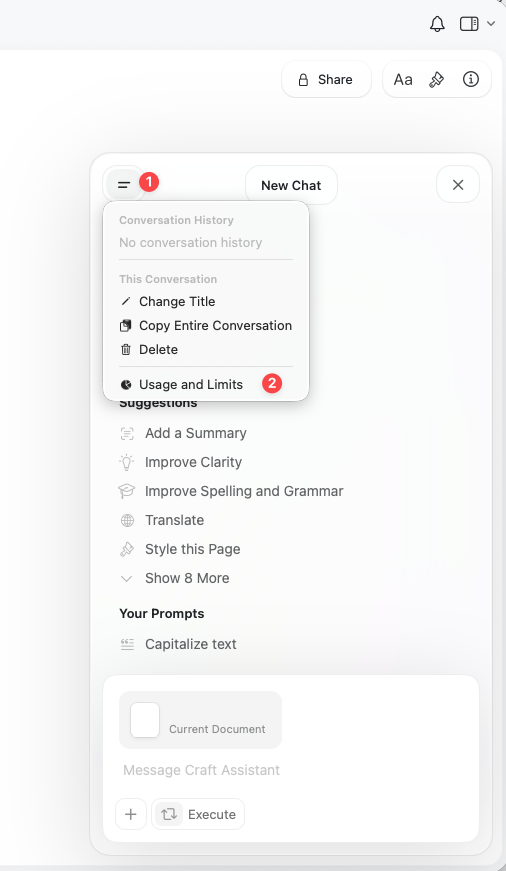
Open the Assistant panel and tap the three-dot menu (⋯).
Choose **Usage & Limits**.
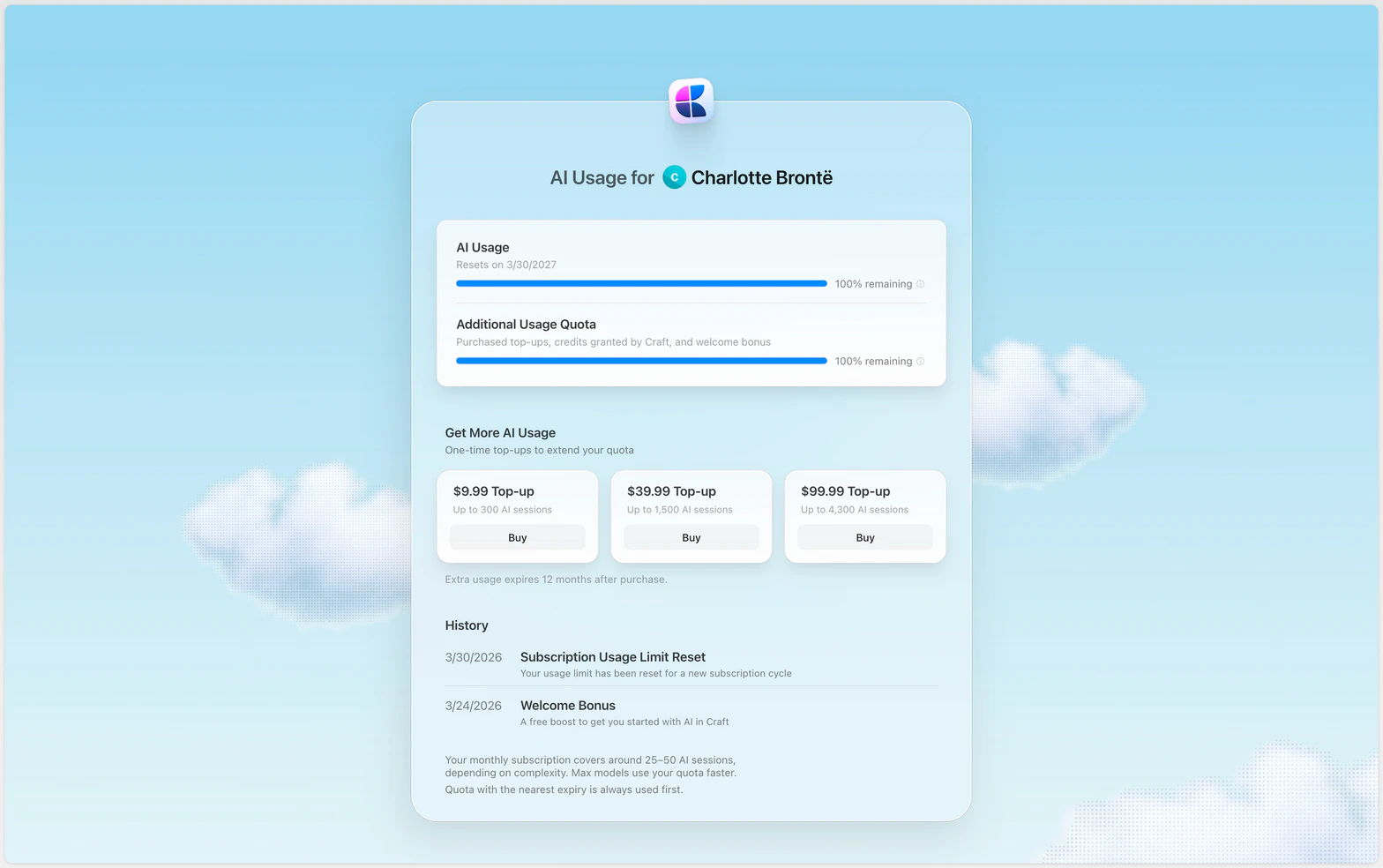
 Under **Get More AI Usage**, pick a top-up pack and select **Buy**.
 ### Top-up packs
| Pack | Approximate usage |
| ----- | ----------------------- |
| \$10 | Up to 300 AI sessions |
| \$40 | Up to 1,500 AI sessions |
| \$100 | Up to 4,300 AI sessions |
Extra usage expires 12 months after purchase. Pricing is shown in USD and VAT may apply.
## Checking your usage
Open the Assistant panel, click the three-dot menu, then choose **Usage & Limits**.
## Quota renewal
* **Monthly plans:** Your quota refreshes each billing month
* **Yearly plans:** Your quota refreshes each billing year
* **Unused quota does not roll over**
* **Nearest expiry first:** When you have both included quota and purchased top-ups, quota with the nearest expiry date is always used first
Included quota renews on your billing cycle. Purchased top-up packs are valid for one year from purchase.
## Free alternatives
If you want to use AI without using your Craft quota:
* **On-device models:** Available on Mac, iPad, and iPhone (always free)
* **Connect your own provider:** Use your own OpenAI or Anthropic credentials instead of Craft AI credits. See [Connect to AI Providers](/en/ai-assistant/bring-your-own-key).
* **MCP and API:** Connect your own ChatGPT or Claude subscription
## Related Articles
Select the right model to balance speed and usage
Learn how to work with the Assistant
Understand how editing affects usage
### Top-up packs
| Pack | Approximate usage |
| ----- | ----------------------- |
| \$10 | Up to 300 AI sessions |
| \$40 | Up to 1,500 AI sessions |
| \$100 | Up to 4,300 AI sessions |
Extra usage expires 12 months after purchase. Pricing is shown in USD and VAT may apply.
## Checking your usage
Open the Assistant panel, click the three-dot menu, then choose **Usage & Limits**.
## Quota renewal
* **Monthly plans:** Your quota refreshes each billing month
* **Yearly plans:** Your quota refreshes each billing year
* **Unused quota does not roll over**
* **Nearest expiry first:** When you have both included quota and purchased top-ups, quota with the nearest expiry date is always used first
Included quota renews on your billing cycle. Purchased top-up packs are valid for one year from purchase.
## Free alternatives
If you want to use AI without using your Craft quota:
* **On-device models:** Available on Mac, iPad, and iPhone (always free)
* **Connect your own provider:** Use your own OpenAI or Anthropic credentials instead of Craft AI credits. See [Connect to AI Providers](/en/ai-assistant/bring-your-own-key).
* **MCP and API:** Connect your own ChatGPT or Claude subscription
## Related Articles
Select the right model to balance speed and usage
Learn how to work with the Assistant
Understand how editing affects usage