> ## Documentation Index
> Fetch the complete documentation index at: https://craft-support.mintlify.site/llms.txt
> Use this file to discover all available pages before exploring further.
# Dates, deadlines & reminders
> Give tasks a schedule, a deadline, and a reminder, and set up tasks that repeat. Learn how schedules and deadlines differ and how recurring tasks work.
Every task can carry its own dates so Craft can organize your work for you. A task can have a schedule, a deadline, a reminder, and a repeat rule, in any combination.
## Schedule vs deadline
These two dates do different jobs, and keeping them straight is the key to a calm task list:
* **Schedule** is when you want to start. A scheduled task appears in Today on its date and shows on your Calendar.
* **Deadline** is when it has to be done. Setting a deadline does not move the task on the calendar by itself.
This distinction also drives what counts as late:
* **Only a past deadline marks a task overdue** (shown in red).
* **A missed schedule date is not overdue.** The task simply rolls forward into Today, so it stays in front of you without being flagged as late.
Select a task and use the hovering toolbar to set a schedule or a deadline.
## The date picker
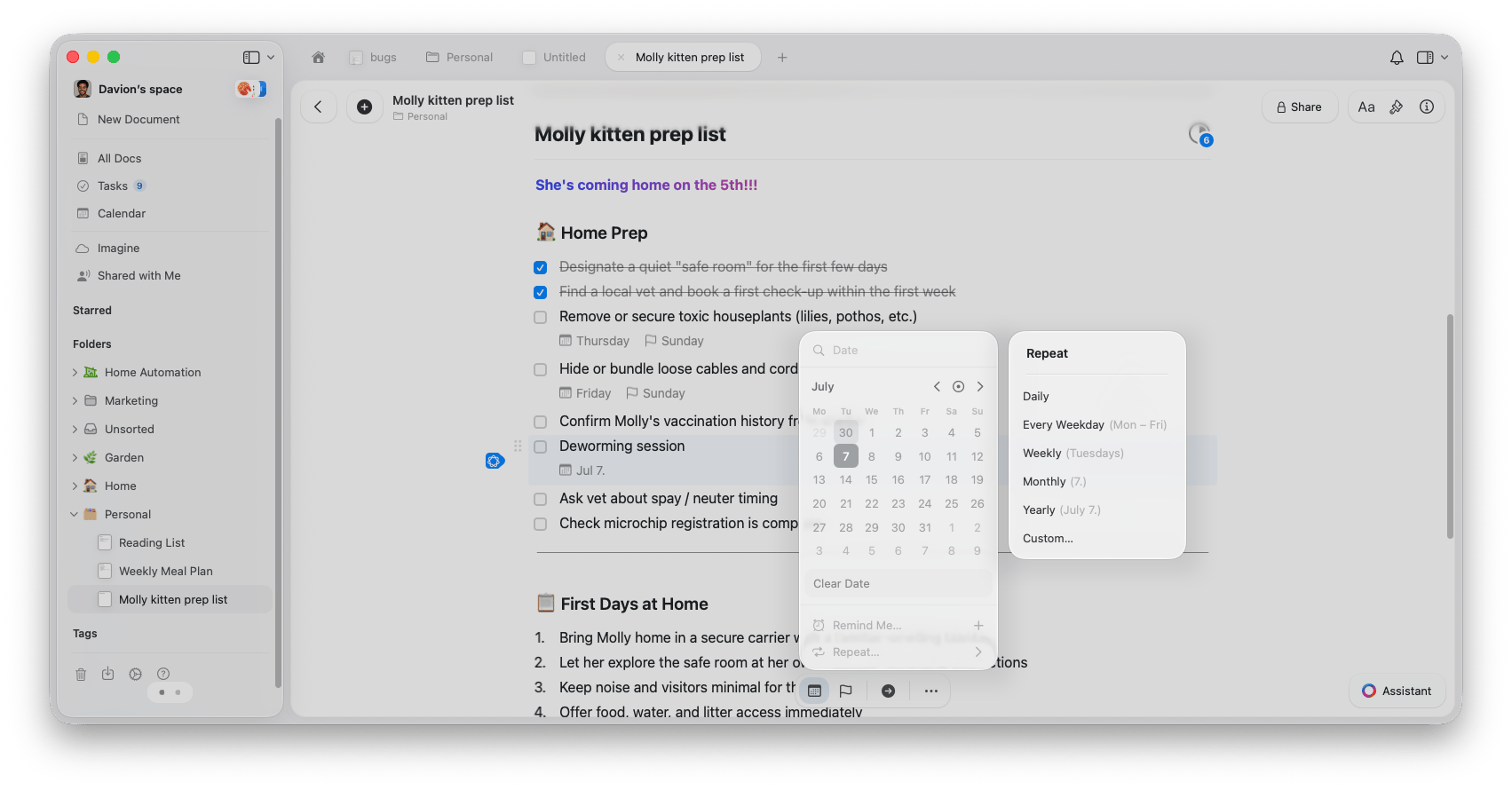
Setting a schedule or a deadline opens a date picker where you choose the day from a calendar. The same picker lets you add a repeat rule or a reminder while you are there.
## Reminders
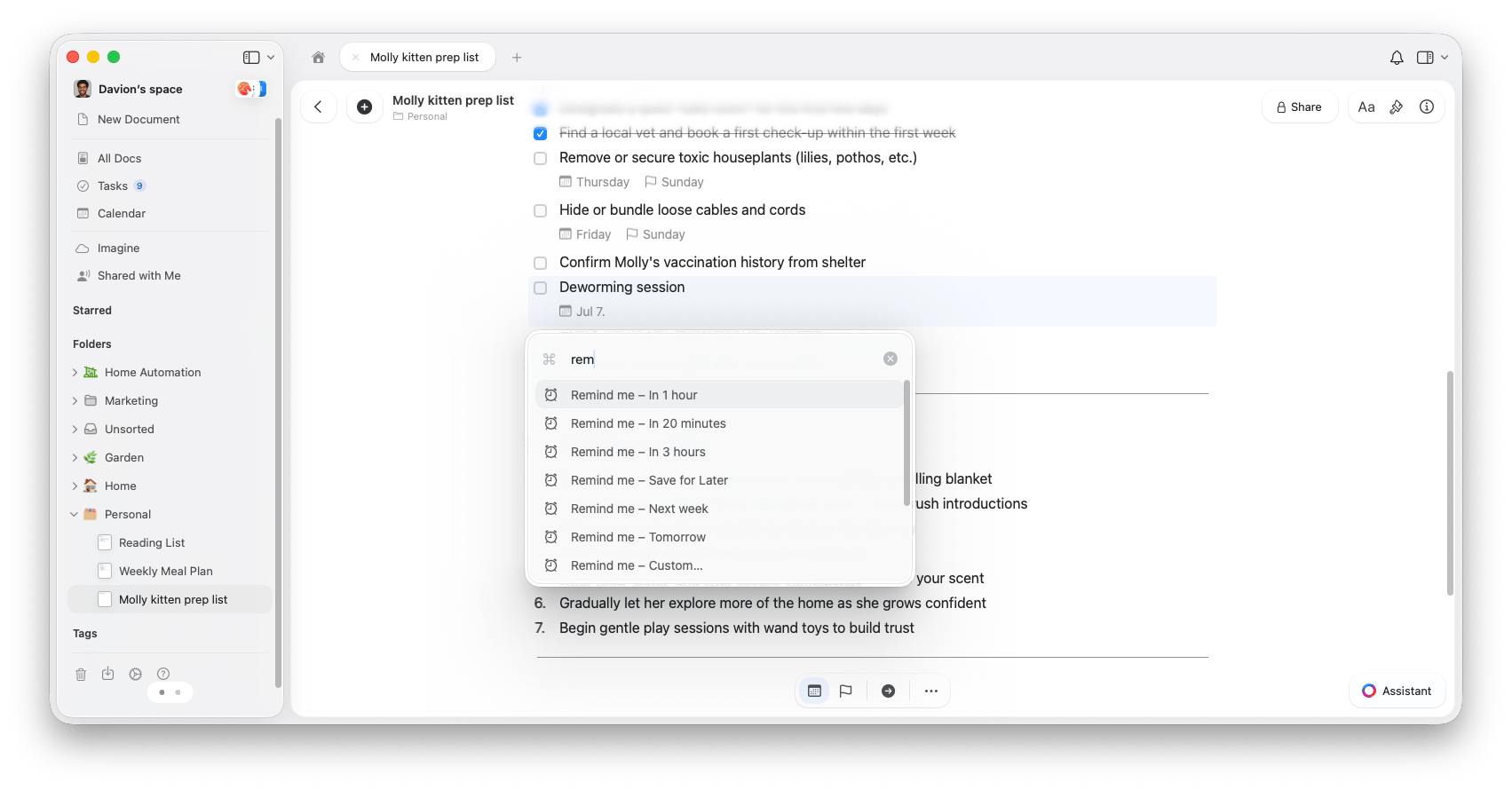
A **reminder** sends you a notification so a key task does not get missed. Reminders are not a tasks-only feature: any block in Craft can have one, and they pair naturally with tasks.
When setting a reminder you can pick a preset (**In 20 minutes**, **In 1 hour**, **In 3 hours**, **Next week**) or choose **Custom...**
For everything reminders can do, see the [Reminders](/en/plan-and-do/reminders) article.
## Recurring tasks
Repeating tasks keep routines on track without you re-adding them each time. You can make any task recurring, whether it lives in the Tasks view or inside a document.
To set up a repeat, open a task's **Schedule**, choose **Repeat**, and pick how often it should recur:
* **Daily** - Repeats every day
* **Every Weekday** - Repeats Monday to Friday
* **Weekly** - Repeats on a specific day of the week
* **Monthly** - Repeats on the same day each month
* **Yearly** - Repeats on the same date each year
* **Custom** - Set your own pattern, for example every 3 days or every second Tuesday
## Keyboard shortcuts on Mac
Power users can manage dates without leaving the keyboard:
| Action | Shortcut |
| ------------------ | -------------------------------- |
| Schedule Task... | `Cmd` + `Shift` + `S` |
| Schedule for Today | `Cmd` + `Shift` + `Option` + `S` |
| Set Deadline... | `Cmd` + `Shift` + `D` |
| Set Reminder... | `Cmd` + `Shift` + `R` |
| Remind in 1 Hour | `Cmd` + `Shift` + `Option` + `R` |
For now, these task features live in the Mac and iPhone/iPad apps. Tasks also work on Windows and the web app, with similar functionality but a reduced set of capabilities and view options.
## Related articles
The Inbox, Today, Upcoming, and All tabs
Select, bulk edit, complete, and review the Logbook
Get notified about important tasks and deadlines
View your tasks, events, and daily notes in one place
 ## Recurring tasks
Repeating tasks keep routines on track without you re-adding them each time. You can make any task recurring, whether it lives in the Tasks view or inside a document.
To set up a repeat, open a task's **Schedule**, choose **Repeat**, and pick how often it should recur:
* **Daily** - Repeats every day
* **Every Weekday** - Repeats Monday to Friday
* **Weekly** - Repeats on a specific day of the week
* **Monthly** - Repeats on the same day each month
* **Yearly** - Repeats on the same date each year
* **Custom** - Set your own pattern, for example every 3 days or every second Tuesday
## Recurring tasks
Repeating tasks keep routines on track without you re-adding them each time. You can make any task recurring, whether it lives in the Tasks view or inside a document.
To set up a repeat, open a task's **Schedule**, choose **Repeat**, and pick how often it should recur:
* **Daily** - Repeats every day
* **Every Weekday** - Repeats Monday to Friday
* **Weekly** - Repeats on a specific day of the week
* **Monthly** - Repeats on the same day each month
* **Yearly** - Repeats on the same date each year
* **Custom** - Set your own pattern, for example every 3 days or every second Tuesday
 ## Keyboard shortcuts on Mac
Power users can manage dates without leaving the keyboard:
| Action | Shortcut |
| ------------------ | -------------------------------- |
| Schedule Task... | `Cmd` + `Shift` + `S` |
| Schedule for Today | `Cmd` + `Shift` + `Option` + `S` |
| Set Deadline... | `Cmd` + `Shift` + `D` |
| Set Reminder... | `Cmd` + `Shift` + `R` |
| Remind in 1 Hour | `Cmd` + `Shift` + `Option` + `R` |
## Keyboard shortcuts on Mac
Power users can manage dates without leaving the keyboard:
| Action | Shortcut |
| ------------------ | -------------------------------- |
| Schedule Task... | `Cmd` + `Shift` + `S` |
| Schedule for Today | `Cmd` + `Shift` + `Option` + `S` |
| Set Deadline... | `Cmd` + `Shift` + `D` |
| Set Reminder... | `Cmd` + `Shift` + `R` |
| Remind in 1 Hour | `Cmd` + `Shift` + `Option` + `R` |