> ## Documentation Index
> Fetch the complete documentation index at: https://craft-support.mintlify.site/llms.txt
> Use this file to discover all available pages before exploring further.
# Indent Depth Limits
> Understanding the 5-level indentation limit designed for mobile readability and document structure.
Craft limits block indentation to **5 levels deep** across all platforms. This constraint ensures your documents remain readable and well-structured, especially on mobile devices where screen space is limited.
## The 5-Level Limit
The root level (no indentation) is level 0. From there, you can indent up to 5 more levels (levels 1 through 5). When you reach level 5, the indent button becomes disabled and you cannot indent further.
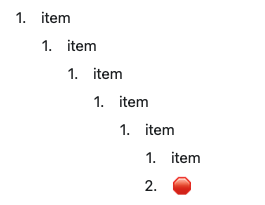 The 5-level limit is intentional, not a technical limitation. It encourages clearer document structure and ensures content remains accessible on all devices.
## Why This Limit Exists
**Mobile readability**: On iPhone and iPad screens, deeply nested content becomes difficult to read and navigate. Five levels provide sufficient hierarchy while maintaining usability.
**Document clarity**: Extremely deep nesting often indicates overly complex structure. The limit encourages you to break content into separate pages or reorganize for better clarity.
**Consistent experience**: The same limit applies across Mac, iOS, Windows, and Web, ensuring your documents look and work the same everywhere.
## Working Within the Limit
If you find yourself hitting the 5-level limit, consider these alternatives:
### Use Subpages
Instead of deep nesting, create subpages to organize related content.
```
Project Overview
├─ Phase 1 (subpage)
│ ├─ Task 1
│ ├─ Task 2
│ └─ Task 3
├─ Phase 2 (subpage)
│ ├─ Task 4
│ └─ Task 5
```
This keeps your structure shallow while maintaining organization and allowing each phase to have its own focused document.
### Reorganize Content
Deep nesting might signal that content should be split:
**Instead of this**:
```
Main Document
├─ Category A
│ ├─ Subcategory 1
│ │ ├─ Item 1
│ │ │ ├─ Detail 1
│ │ │ │ └─ Sub-detail (can't indent further!)
```
**Try this**:
```
Main Document
├─ Category A (link to separate page)
Category A Page
├─ Subcategory 1
│ ├─ Item 1
│ │ └─ Detail 1
```
### Use Collections
For structured data with many attributes, Collections provide a better solution than deep indentation:
Instead of nesting client information 5+ levels deep, use a Collection with fields for each attribute. Each row can have its own subpage with unlimited organization.
### Combine with Toggles
Use toggle blocks to hide complexity without adding indentation depth:
```
Project Tasks
├─ High Priority
│ └─ [Toggle] 10 tasks hidden
├─ Medium Priority
│ └─ [Toggle] 15 tasks hidden
```
This keeps your document structure clean while allowing detailed content when needed.
## Platform Differences
The 5-level limit applies consistently across all platforms, but the way you interact with it varies:
**macOS**: Indent with `Tab`, outdent with `Shift+Tab`. The Tab key becomes inactive at level 5.
**iOS/iPadOS**: Use the indent buttons in the toolbar or swipe gestures. The indent button is disabled at level 5.
**Windows/Web**: Use `Tab` and `Shift+Tab` similar to macOS.
This limit applies to **all block types** including text blocks, tasks, lists, and pages. There are no exceptions.
## Common Questions
**Can I request deeper nesting?**
The 5-level limit is a design decision that balances structure with readability. If you need deeper hierarchy, consider using subpages or Collections instead.
**Does this affect Collections?**
Collections themselves don't have indentation limits, but content within collection cells follows the same 5-level rule.
**What about imported documents?**
When importing documents with deeper nesting (like from other apps), Craft flattens content beyond level 5 to maintain the limit.
If you regularly hit the 5-level limit, it's a signal to reconsider your document structure. Clear, focused documents with linked subpages are usually easier to navigate and maintain than deeply nested outlines.
## Related Articles
Learn about Craft's building blocks
Organize content with nested documents
Structure complex data with database-style tables
The 5-level limit is intentional, not a technical limitation. It encourages clearer document structure and ensures content remains accessible on all devices.
## Why This Limit Exists
**Mobile readability**: On iPhone and iPad screens, deeply nested content becomes difficult to read and navigate. Five levels provide sufficient hierarchy while maintaining usability.
**Document clarity**: Extremely deep nesting often indicates overly complex structure. The limit encourages you to break content into separate pages or reorganize for better clarity.
**Consistent experience**: The same limit applies across Mac, iOS, Windows, and Web, ensuring your documents look and work the same everywhere.
## Working Within the Limit
If you find yourself hitting the 5-level limit, consider these alternatives:
### Use Subpages
Instead of deep nesting, create subpages to organize related content.
```
Project Overview
├─ Phase 1 (subpage)
│ ├─ Task 1
│ ├─ Task 2
│ └─ Task 3
├─ Phase 2 (subpage)
│ ├─ Task 4
│ └─ Task 5
```
This keeps your structure shallow while maintaining organization and allowing each phase to have its own focused document.
### Reorganize Content
Deep nesting might signal that content should be split:
**Instead of this**:
```
Main Document
├─ Category A
│ ├─ Subcategory 1
│ │ ├─ Item 1
│ │ │ ├─ Detail 1
│ │ │ │ └─ Sub-detail (can't indent further!)
```
**Try this**:
```
Main Document
├─ Category A (link to separate page)
Category A Page
├─ Subcategory 1
│ ├─ Item 1
│ │ └─ Detail 1
```
### Use Collections
For structured data with many attributes, Collections provide a better solution than deep indentation:
Instead of nesting client information 5+ levels deep, use a Collection with fields for each attribute. Each row can have its own subpage with unlimited organization.
### Combine with Toggles
Use toggle blocks to hide complexity without adding indentation depth:
```
Project Tasks
├─ High Priority
│ └─ [Toggle] 10 tasks hidden
├─ Medium Priority
│ └─ [Toggle] 15 tasks hidden
```
This keeps your document structure clean while allowing detailed content when needed.
## Platform Differences
The 5-level limit applies consistently across all platforms, but the way you interact with it varies:
**macOS**: Indent with `Tab`, outdent with `Shift+Tab`. The Tab key becomes inactive at level 5.
**iOS/iPadOS**: Use the indent buttons in the toolbar or swipe gestures. The indent button is disabled at level 5.
**Windows/Web**: Use `Tab` and `Shift+Tab` similar to macOS.
This limit applies to **all block types** including text blocks, tasks, lists, and pages. There are no exceptions.
## Common Questions
**Can I request deeper nesting?**
The 5-level limit is a design decision that balances structure with readability. If you need deeper hierarchy, consider using subpages or Collections instead.
**Does this affect Collections?**
Collections themselves don't have indentation limits, but content within collection cells follows the same 5-level rule.
**What about imported documents?**
When importing documents with deeper nesting (like from other apps), Craft flattens content beyond level 5 to maintain the limit.
If you regularly hit the 5-level limit, it's a signal to reconsider your document structure. Clear, focused documents with linked subpages are usually easier to navigate and maintain than deeply nested outlines.
## Related Articles
Learn about Craft's building blocks
Organize content with nested documents
Structure complex data with database-style tables