> ## Documentation Index
> Fetch the complete documentation index at: https://craft-support.mintlify.site/llms.txt
> Use this file to discover all available pages before exploring further.
# Quick Styling Methods
> Format your content quickly using keyboard shortcuts, markdown, or the slash menu.
Beyond using buttons and visual controls, Craft offers several keyboard-driven ways to format your content quickly. Choose the method that fits your workflow best.
## The Slash Command Menu
Press `/` while editing or with blocks selected to open the command menu. Start typing to filter for the desired style or action.
Learn more about the [slash menu](/en/write-and-edit/formatting/slash-menu).
## Markdown Formatting
Craft supports the full suite of markdown formatting options. For example, type `**bold text**` and it will appear as **bold text**.
See the complete [list of markdown shortcuts](/en/write-and-edit/formatting/markdown-shortcuts).
## Keyboard Shortcuts
Craft supports over 75 keyboard shortcuts across all platforms. Hover over buttons to see their shortcuts - here are some favorites:
* `Cmd +` / `Ctrl +` to increase text size
* `Cmd -` / `Ctrl -` to decrease text size
* `Cmd B` / `Ctrl B` for **bold**
* `Cmd I` / `Ctrl I` for *italic*
* `Tab` to increase indent
* `Shift Tab` to decrease indent
On Mac, click the question mark button in the bottom right corner to see all available shortcuts. On other platforms, hover over toolbar buttons to reveal their keyboard shortcuts.
### Indent Depth Limit
Craft supports up to **5 levels of indentation** for lists and nested content. This limit ensures documents remain readable and perform well across all devices, especially on mobile.
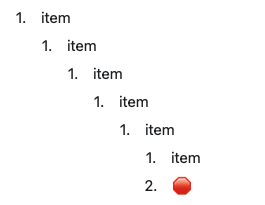 If you need deeper nesting for complex hierarchies, consider:
* Breaking content into separate documents with links between them
* Using Collections for deeply structured data
* Creating subpages within a parent document
The 5-level limit is particularly important for mobile devices, where deeply nested content can be difficult to read and navigate on smaller screens.
## Choosing Your Method
* **Slash menu** - Great for discovering features and formatting options
* **Markdown** - Fast for those familiar with markdown syntax
* **Keyboard shortcuts** - Most efficient once memorized for frequently used actions
All three methods work together, so you can mix and match based on what you're doing.
If you need deeper nesting for complex hierarchies, consider:
* Breaking content into separate documents with links between them
* Using Collections for deeply structured data
* Creating subpages within a parent document
The 5-level limit is particularly important for mobile devices, where deeply nested content can be difficult to read and navigate on smaller screens.
## Choosing Your Method
* **Slash menu** - Great for discovering features and formatting options
* **Markdown** - Fast for those familiar with markdown syntax
* **Keyboard shortcuts** - Most efficient once memorized for frequently used actions
All three methods work together, so you can mix and match based on what you're doing.