> ## Documentation Index
> Fetch the complete documentation index at: https://craft-support.mintlify.site/llms.txt
> Use this file to discover all available pages before exploring further.
# Subscripts and Superscripts
> Add subscript and superscript formatting using inline formulas or shortcuts.
You can add subscripts and superscripts to your text using mathematical notation shortcuts or the inline formula feature.
## Using Shortcuts
Type these inline formulas directly in your text:
* **Subscript**: `$$_2$$` (for example: H₂O would be `H$$_2$$O`)
* **Superscript**: `$$^2$$` (for example: x² would be `x$$^2$$`)
## Using Inline Formulas
You can also use the inline formula feature to create more complex subscripts and superscripts:
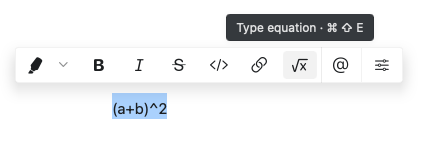 To insert an inline formula:
1. Type `$` twice to open the formula editor
2. Enter your mathematical notation (e.g., `_2` for subscript or `^2` for superscript)
3. Type `$` twice again to close the formula
Craft uses LaTeX-style mathematical notation for formulas. For complex equations beyond simple subscripts and superscripts, see [Math Formulas](/en/write-and-edit/math-formulas).
To insert an inline formula:
1. Type `$` twice to open the formula editor
2. Enter your mathematical notation (e.g., `_2` for subscript or `^2` for superscript)
3. Type `$` twice again to close the formula
Craft uses LaTeX-style mathematical notation for formulas. For complex equations beyond simple subscripts and superscripts, see [Math Formulas](/en/write-and-edit/math-formulas).