> ## Documentation Index
> Fetch the complete documentation index at: https://craft-support.mintlify.site/llms.txt
> Use this file to discover all available pages before exploring further.
# 下付き文字と上付き文字
> インライン数式やショートカットを使って下付き文字と上付き文字の書式を追加します。
数式の記法ショートカットやインライン数式機能を使って、テキストに下付き文字と上付き文字を追加できます。
## ショートカットを使う
テキスト内に直接以下のインライン数式を入力します:
* **下付き文字**: `$$_2$$`(例えば:H₂O は `H$$_2$$O`)
* **上付き文字**: `$$^2$$`(例えば:x² は `x$$^2$$`)
## インライン数式を使う
より複雑な下付き文字や上付き文字を作成するには、インライン数式機能も使用できます。
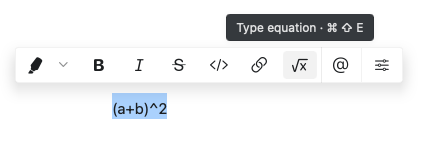 インライン数式を挿入する手順:
1. 数式エディタを開くには、`$` を2回入力します
2. 数式を入力します(例:下付き文字は `_2`、上付き文字は `^2`)
3. 数式を閉じるには、再度 `$` を2回入力します
Craft は LaTeX スタイルの数式記法を使用します。これにより、下付き文字や上付き文字とともに複雑な数式を簡単に作成できます。
インライン数式を挿入する手順:
1. 数式エディタを開くには、`$` を2回入力します
2. 数式を入力します(例:下付き文字は `_2`、上付き文字は `^2`)
3. 数式を閉じるには、再度 `$` を2回入力します
Craft は LaTeX スタイルの数式記法を使用します。これにより、下付き文字や上付き文字とともに複雑な数式を簡単に作成できます。