> ## Documentation Index
> Fetch the complete documentation index at: https://craft-support.mintlify.site/llms.txt
> Use this file to discover all available pages before exploring further.
# 폴더
> 모든 문서와 하위 콘텐츠를 포함한 폴더 전체를 내보냅니다.
Craft에서 폴더를 내보내면 콘텐츠를 편리한 형식으로 다운로드할 수 있습니다.
현재는 **macOS 앱**에서만 폴더를 내보낼 수 있습니다.
## 폴더를 내보내는 방법
**폴더 열기**
내보낼 폴더로 이동하세요.
**내보내기 옵션 열기**
폴더 보기 오른쪽 상단의 \*\*three-dot menu (⋯)\*\*를 클릭하세요.
**Export 선택**
원하는 Export 형식(예: PDF, Markdown, TextBundle 등)을 선택하세요.
**내보낸 파일 저장**
지시에 따라 파일을 원하는 기기 위치에 저장하세요.
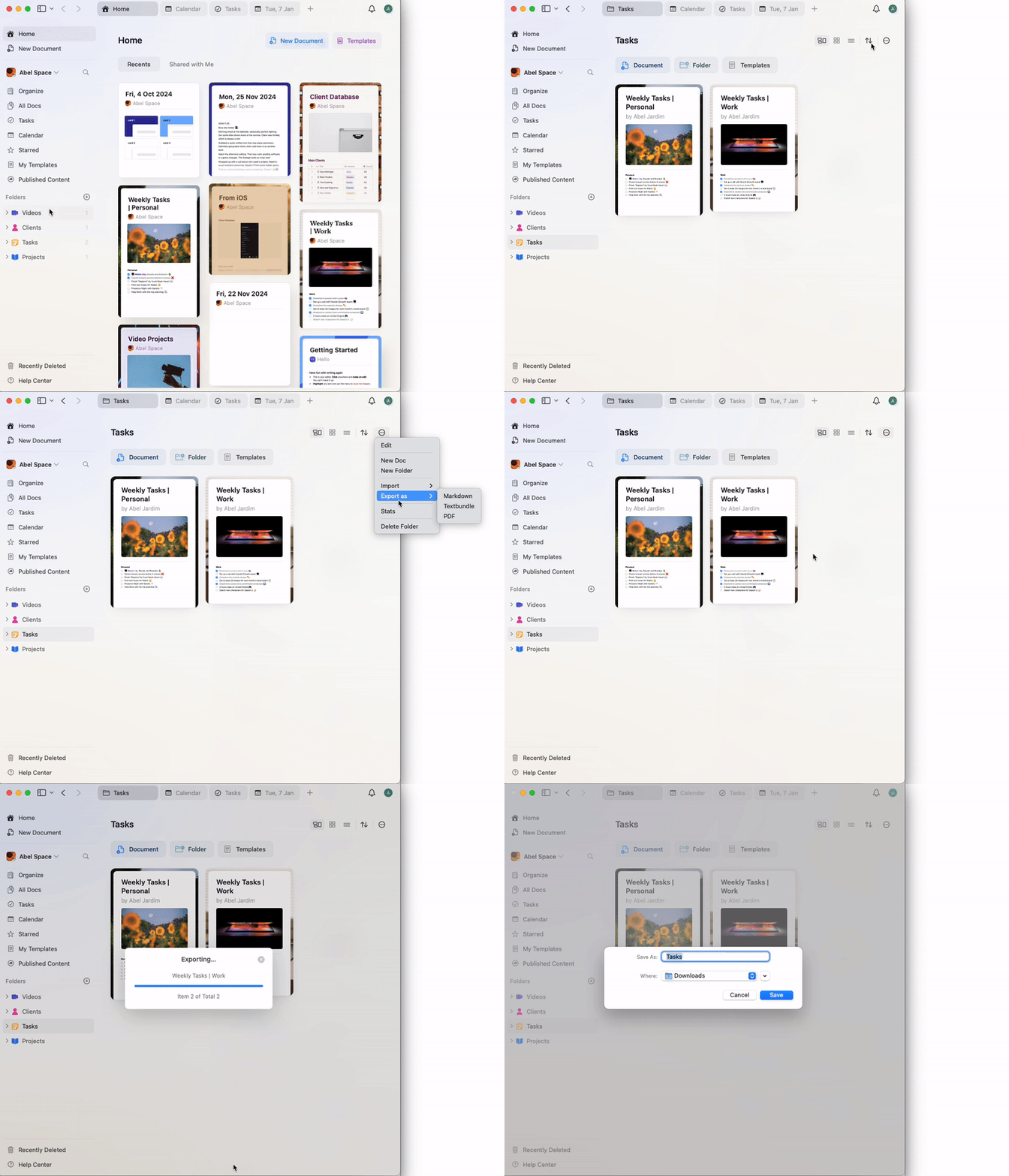 내보내기에는 폴더 내의 모든 문서와 하위 페이지가 포함됩니다. 내보내기 중 문제가 발생하면 앱이 최신 상태인지 확인하고, 필요하면 더 작은 묶음으로 나누어 내보내기를 시도하세요.