> ## Documentation Index
> Fetch the complete documentation index at: https://craft-support.mintlify.site/llms.txt
> Use this file to discover all available pages before exploring further.
# Google 지도 임베드하기
> 대화형 Google 지도 링크를 Craft 문서에 바로 임베드할 수 있습니다.
다음 단계를 따라 Google 지도 링크를 Craft 문서에 손쉽게 임베드할 수 있습니다:
**Google 지도 링크 붙여넣기**
Google Maps에서 링크를 복사한 다음 카드 블록으로 Craft 문서에 붙여넣습니다.
**블록 옵션 열기**
문서 내 블록 왼쪽에서 **three-dot menu (⋯)** 를 클릭하여 블록 옵션을 엽니다.
**Embed 옵션 선택**
메뉴에서 **Embed** 옵션을 선택합니다. 그러면 Google 지도 링크가 임베드된 지도 블록으로 변환됩니다.
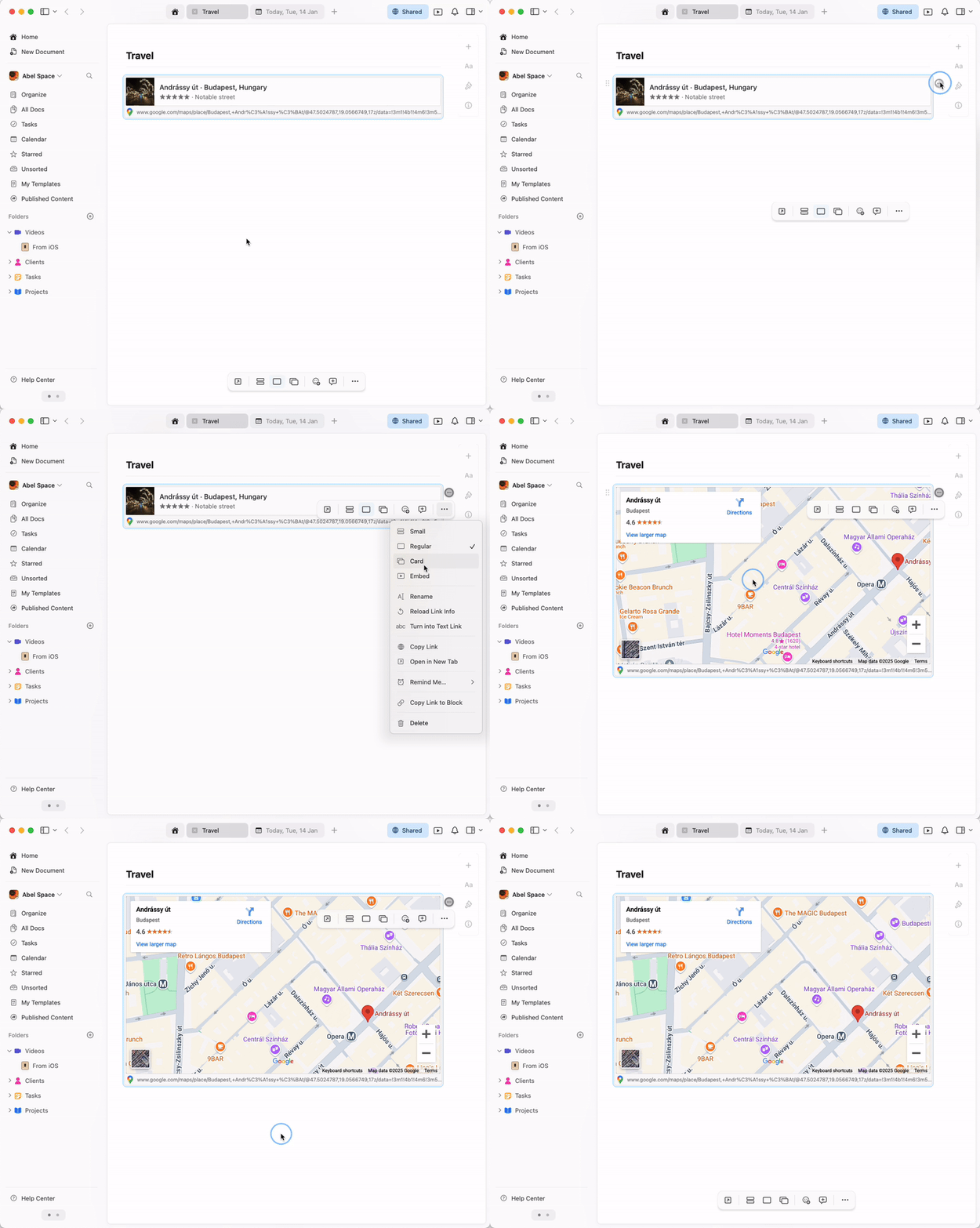 임베드된 지도는 완전히 상호작용이 가능합니다 - Craft 문서 내에서 직접 확대/축소, 이동 및 위치를 탐색할 수 있습니다.