> ## Documentation Index
> Fetch the complete documentation index at: https://craft-support.mintlify.site/llms.txt
> Use this file to discover all available pages before exploring further.

# 连接 AI 提供商

> 使用您自己的 OpenAI 或 Anthropic 凭据连接 Craft Assistant，而无需消耗 Craft AI 积分。

Craft Assistant 默认使用 Craft AI 积分，但您也可以连接自己的 AI 提供商账户。使用已连接的提供商时，不会消耗任何 Craft AI 积分。

<Info>
  此功能仅适用于 **macOS** 和 **iOS**，目前不支持 Web 或 Windows。
</Info>

## 可用提供商

| 提供商           | 连接方式                      |
| ------------- | ------------------------- |
| **OpenAI**    | 使用 ChatGPT 账户登录或粘贴 API 密钥 |
| **Anthropic** | 粘贴 API 密钥                 |
| **本地模型**      | 在设备上运行，无需连接               |
| **Craft**     | 默认方式，使用 Craft AI 积分       |

<Info>
  使用已连接的提供商时，对话将通过该提供商的 API 处理，不影响 Craft AI 使用配额。
</Info>

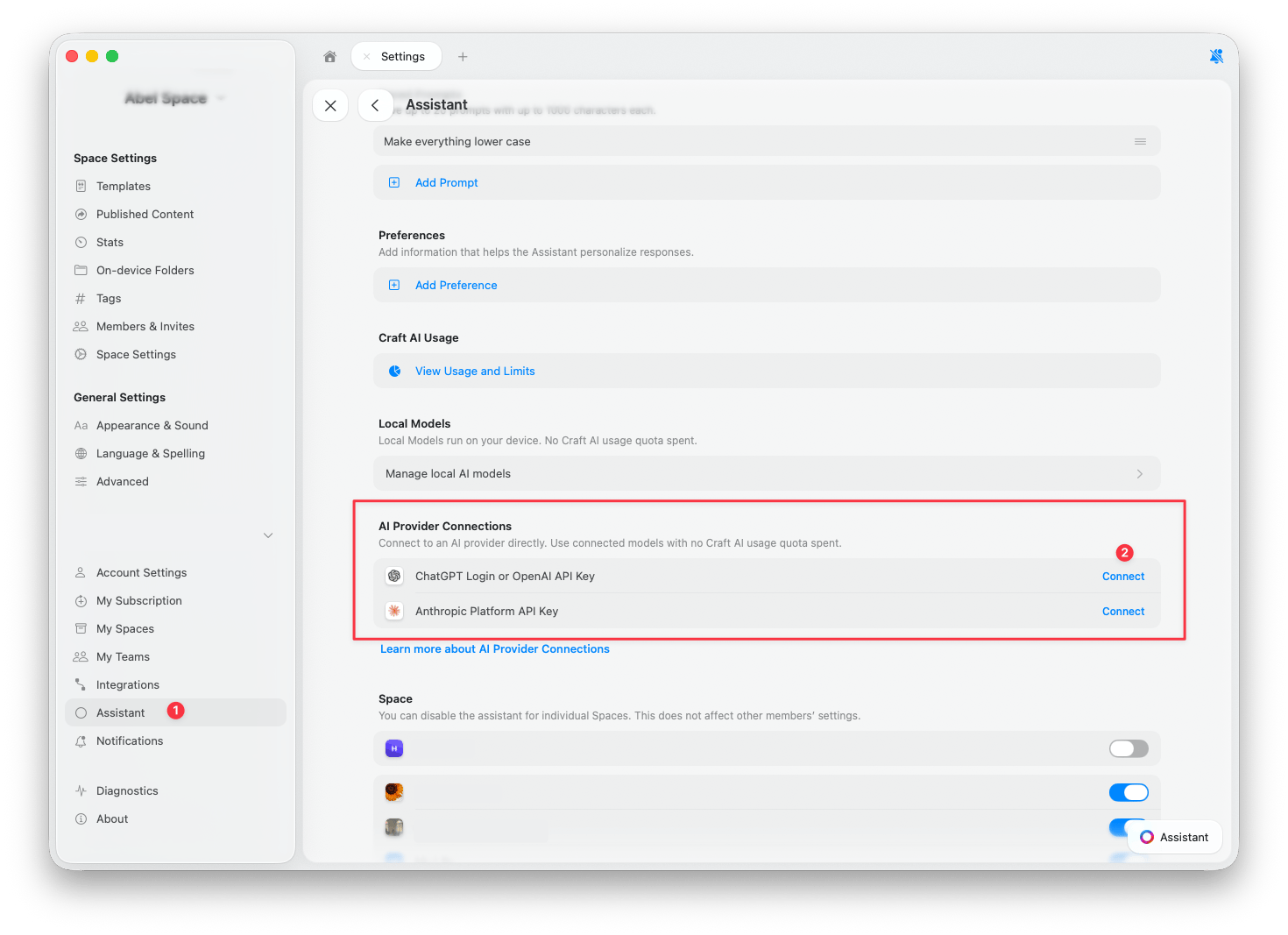
## 连接提供商

<Steps>
  <Step title="打开设置">
    前往 **设置** > **助手**。
  </Step>

  <Step title="找到 AI 提供商连接">
    向下滚动至 **AI 提供商连接** 部分。
  </Step>

  <Step title="点击连接">
    点击要添加的提供商旁边的 **连接**。
  </Step>

  <Step title="确认当前提供商">
    打开助手面板，确认已选择新的提供商。新对话会自动使用已连接的提供商，但已打开的对话可能仍在使用 Craft。请参阅[切换提供商](#切换提供商)了解如何更改。
  </Step>
</Steps>

<Frame caption="点击可放大">
  <img src="https://mintcdn.com/craft-support/mrn9h3Zv_F-f37nX/images/ai-assistant/bring-your-own-key/en/content/settings-ai-provider-connections.png?fit=max&auto=format&n=mrn9h3Zv_F-f37nX&q=85&s=b7258cea96e57b581394a1f82ad381cc" alt="AI Provider Connections section in Settings showing OpenAI and Anthropic options" width="1470" height="1067" data-path="images/ai-assistant/bring-your-own-key/en/content/settings-ai-provider-connections.png" />
</Frame>

### OpenAI

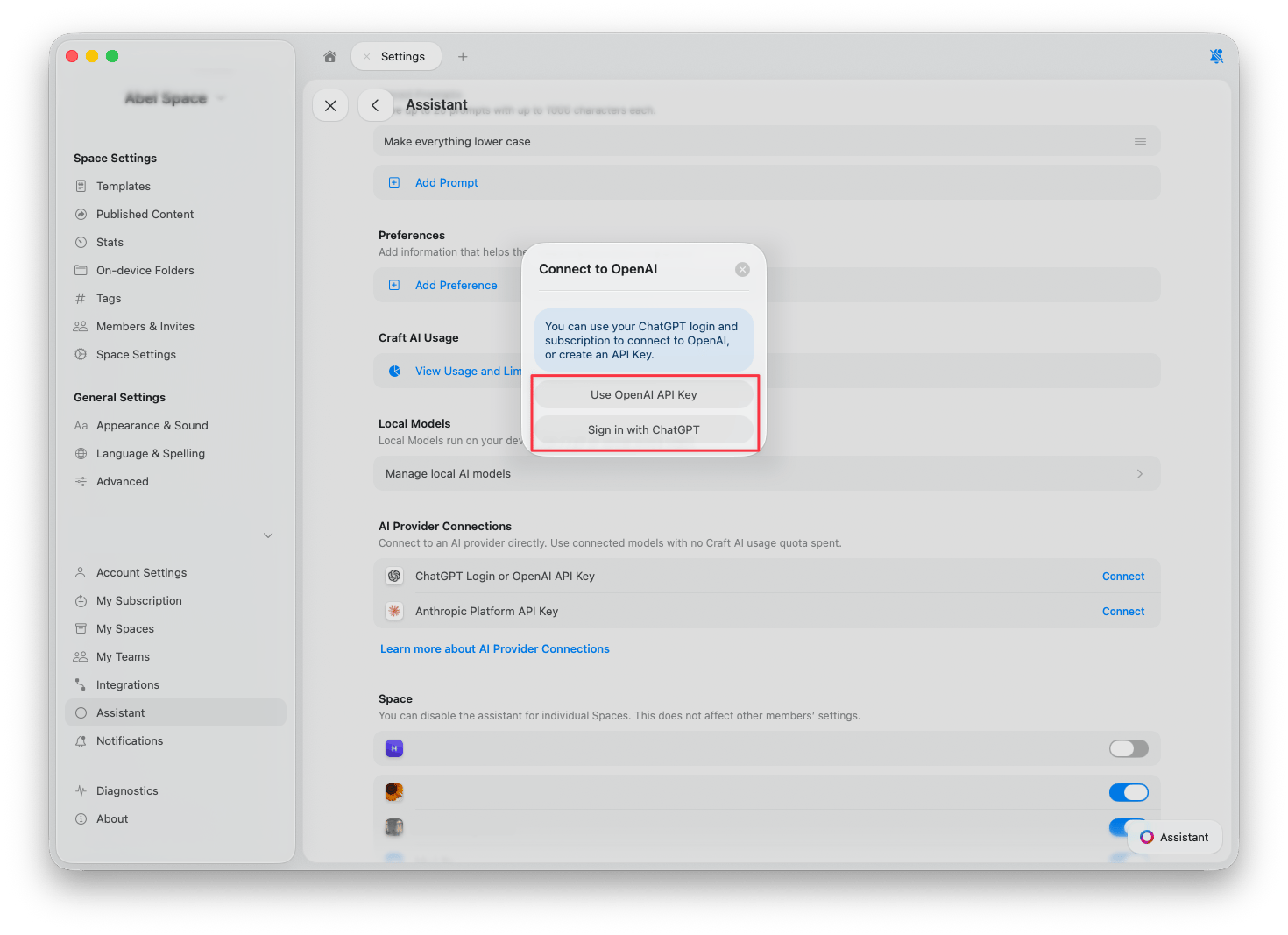
连接 OpenAI 有两种方式：

* **使用 ChatGPT 登录**：使用您现有的 ChatGPT 账户和订阅，无需 API 密钥。
* **使用 OpenAI API 密钥**：粘贴来自 [OpenAI Platform](https://platform.openai.com/api-keys) 的 API 密钥，使用费用将计入您的 OpenAI 账户。

<Frame>
  <img src="https://mintcdn.com/craft-support/mrn9h3Zv_F-f37nX/images/ai-assistant/bring-your-own-key/en/content/connect-openai-dialog.png?fit=max&auto=format&n=mrn9h3Zv_F-f37nX&q=85&s=0c42784bf0718402b2f4b626a621f9a4" alt="Connect to OpenAI dialog with two options: Use OpenAI API Key and Sign in with ChatGPT" width="1470" height="1067" data-path="images/ai-assistant/bring-your-own-key/en/content/connect-openai-dialog.png" />
</Frame>

### Anthropic

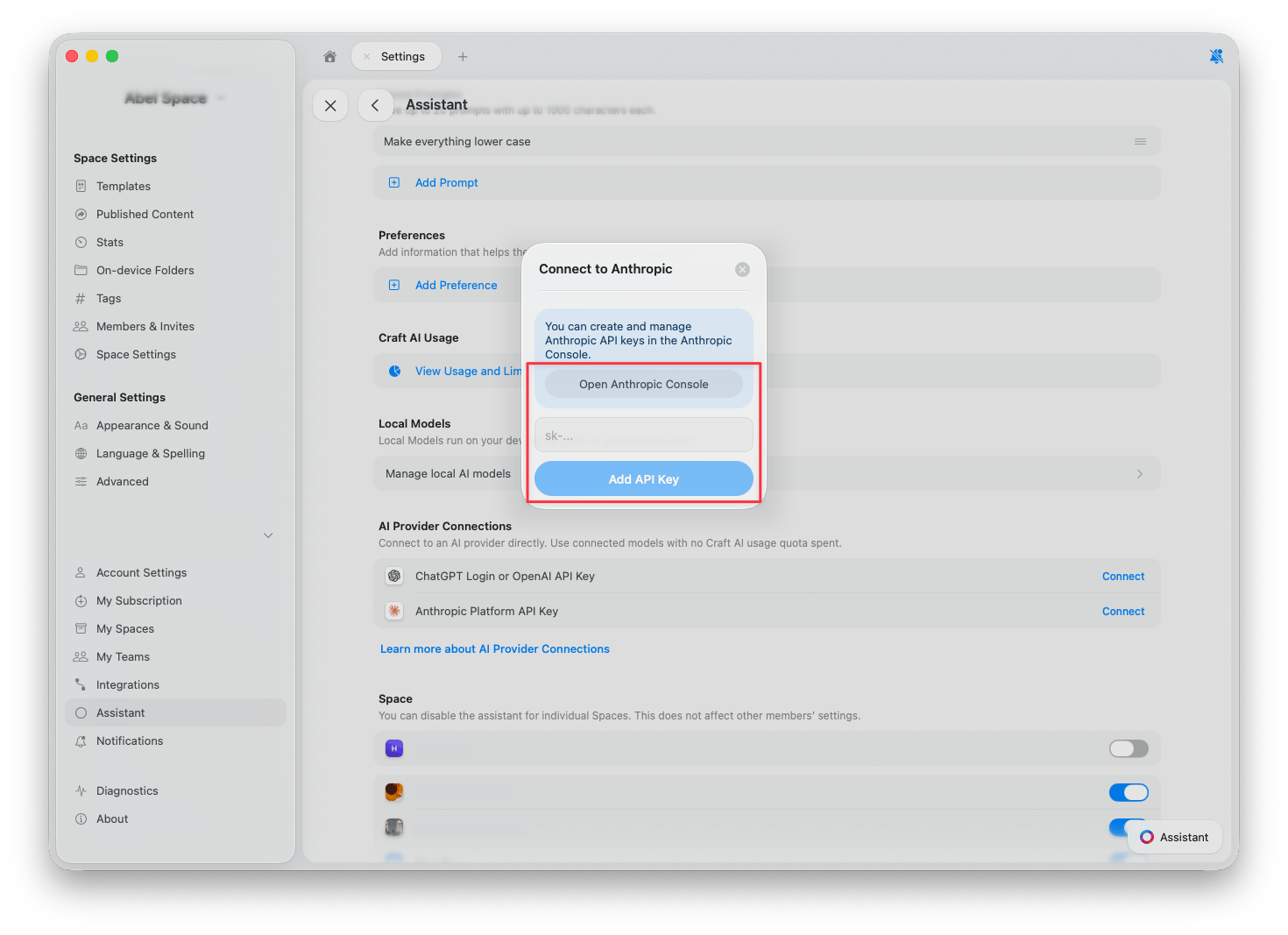
连接 Anthropic 时，请粘贴来自 [Anthropic Console](https://console.anthropic.com/) 的 API 密钥，使用费用将计入您的 Anthropic 账户。

<Frame>
  <img src="https://mintcdn.com/craft-support/mrn9h3Zv_F-f37nX/images/ai-assistant/bring-your-own-key/en/content/connect-anthropic-dialog.png?fit=max&auto=format&n=mrn9h3Zv_F-f37nX&q=85&s=99975bfc8d17d7a33ca55af604b3b23e" alt="Connect to Anthropic dialog with API key field and Open Anthropic Console button" width="1470" height="1067" data-path="images/ai-assistant/bring-your-own-key/en/content/connect-anthropic-dialog.png" />
</Frame>

## 切换提供商

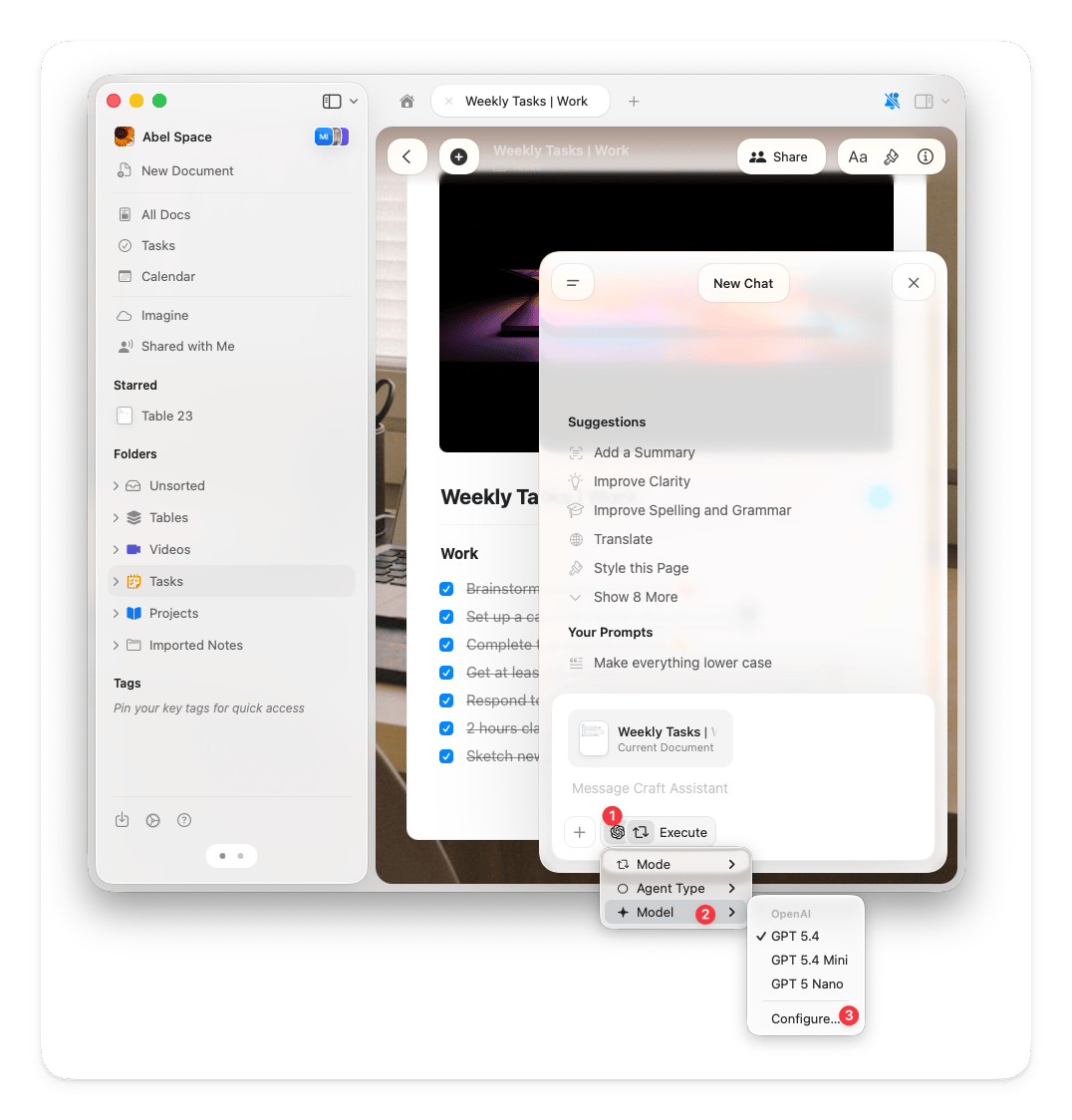
连接提供商后，您可以直接在助手面板中切换提供商和模型。

<Steps>
  <Step title="打开助手面板">
    从任意文档或空间视图打开助手。
  </Step>

  <Step title="点击助手按钮">
    在输入框下方，点击 **助手按钮**。
  </Step>

  <Step title="选择模型">
    在弹出菜单中选择 **模型**，已连接提供商的模型将与 Craft 模型一同显示。
  </Step>
</Steps>

<Frame>
  <img src="https://mintcdn.com/craft-support/mrn9h3Zv_F-f37nX/images/ai-assistant/bring-your-own-key/en/content/model-selector-provider.png?fit=max&auto=format&n=mrn9h3Zv_F-f37nX&q=85&s=58d8da8fb4d5adb65f5f04222a1b5f23" alt="Model selector in the Assistant panel showing OpenAI models" width="1076" height="1124" data-path="images/ai-assistant/bring-your-own-key/en/content/model-selector-provider.png" />
</Frame>

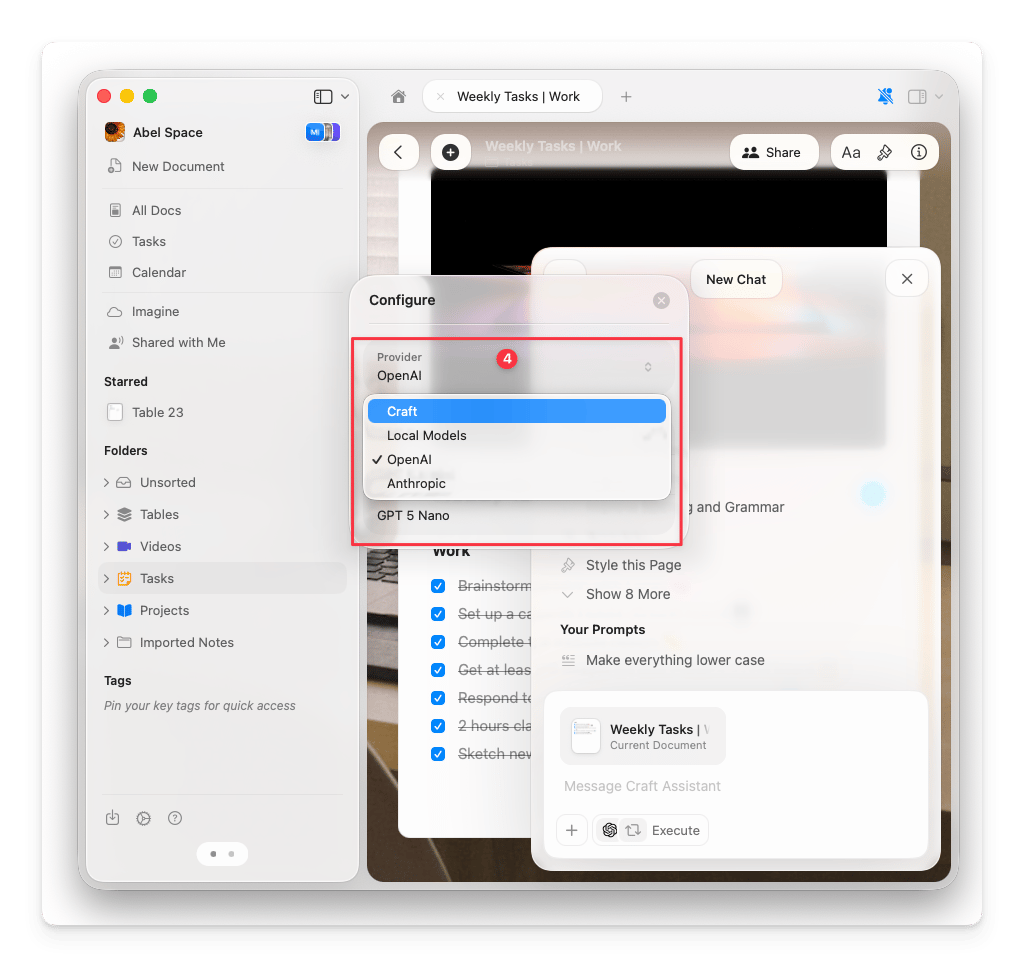
若要更改当前提供商，请点击模型列表底部的 **配置**，然后在 **提供商** 下拉菜单中选择所需提供商。

<Frame>
  <img src="https://mintcdn.com/craft-support/mrn9h3Zv_F-f37nX/images/ai-assistant/bring-your-own-key/en/content/configure-provider-dropdown.png?fit=max&auto=format&n=mrn9h3Zv_F-f37nX&q=85&s=e64aeb2da5097bb72d3e02a0366e762d" alt="Configure dialog showing provider dropdown with Craft, Local Models, OpenAI, and Anthropic" width="1024" height="967" data-path="images/ai-assistant/bring-your-own-key/en/content/configure-provider-dropdown.png" />
</Frame>

<Tip>
  您可以通过对话中的标识查看当前使用的提供商。提供商的图标会显示在模型名称旁边，让您随时了解当前对话使用的是 Craft 积分还是自己的提供商。
</Tip>

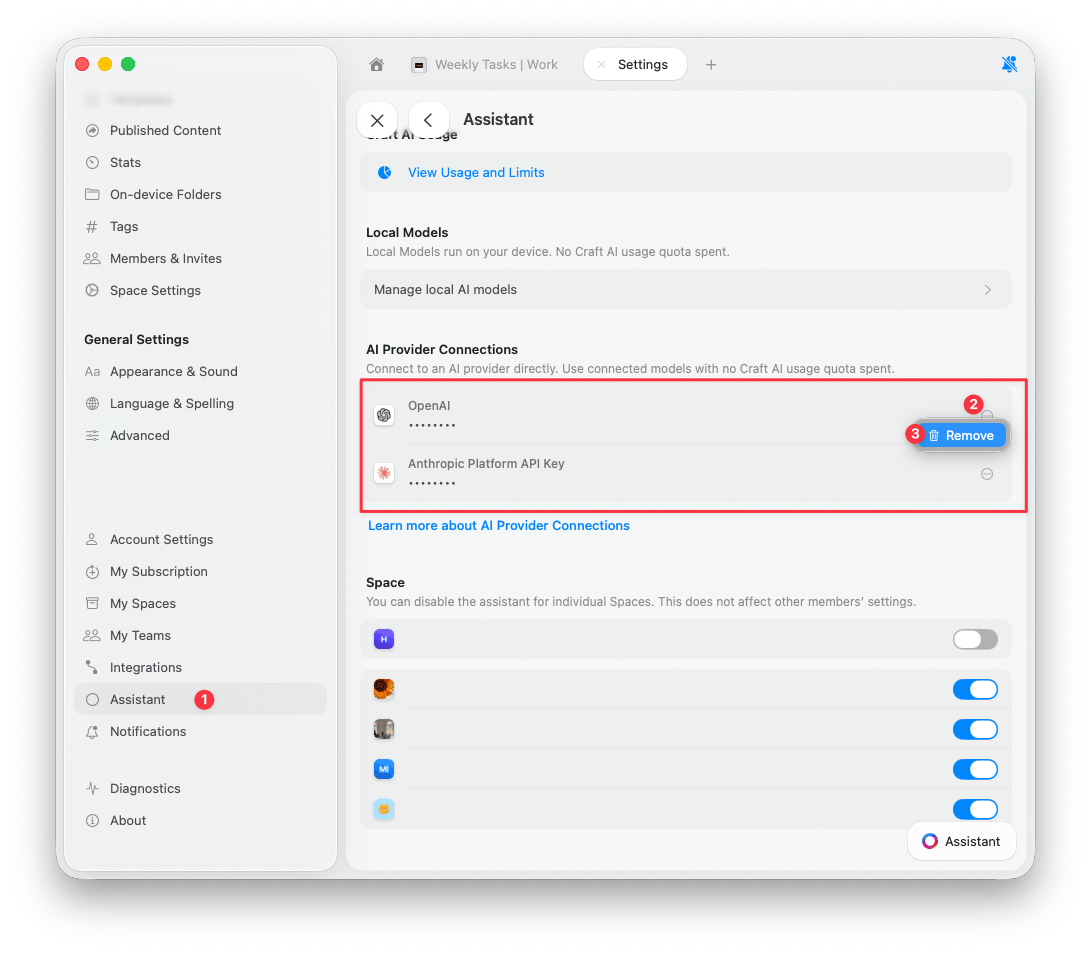
## 移除连接

<Steps>
  <Step title="打开设置">
    前往 **设置** > **助手**。
  </Step>

  <Step title="找到连接">
    在 **AI 提供商连接** 部分，找到要移除的提供商。
  </Step>

  <Step title="移除">
    点击连接旁边的 **三点按钮**，然后点击 **移除**。
  </Step>
</Steps>

<Frame>
  <img src="https://mintcdn.com/craft-support/mrn9h3Zv_F-f37nX/images/ai-assistant/bring-your-own-key/en/content/remove-connection.png?fit=max&auto=format&n=mrn9h3Zv_F-f37nX&q=85&s=d047ca8c12d7fb24a5e088400343bd1c" alt="AI Provider Connections showing connected providers with Remove button" width="1091" height="953" data-path="images/ai-assistant/bring-your-own-key/en/content/remove-connection.png" />
</Frame>

移除连接后，助手将切换回使用 Craft AI 积分。

<Columns cols={2}>
  <Card title="选择 AI 模型" href="/zh-Hans/ai-assistant/models" />

  <Card title="AI 积分" href="/zh-Hans/ai-assistant/usage" />
</Columns>