> ## Documentation Index
> Fetch the complete documentation index at: https://craft-support.mintlify.site/llms.txt
> Use this file to discover all available pages before exploring further.
# 選擇 AI 模型
> 根據任務的速度、能力與 AI 用量需求,選擇最合適的 AI 模型。
Craft 提供多種各具優勢的 AI 模型。選擇合適的模型有助於管理 AI 用量,並讓模型配合任務的規模與複雜度。
## 如何切換模型
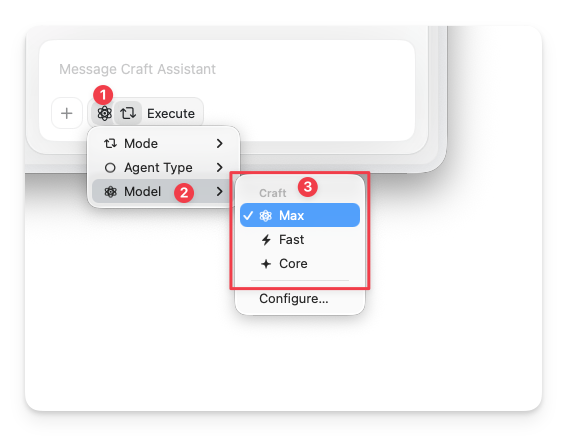
您可以隨時在 Assistant 面板中切換模型。
從任何文件或空間檢視中開啟 Assistant。
在輸入欄下方點擊 **Assistant 按鈕**。
在彈出選單中選擇 **Model**,然後挑選您想使用的模型。
 ## 模型比較
| 模型 | 用量 | 最適合 | 對話 | 編輯 |
| -------- | -- | ---------------- | ---- | -- |
| **Max** | 高 | 複雜推理、多文件處理、長篇摘要 | 多輪對話 | 是 |
| **Fast** | 中 | 空間層級問題、深度分析、較長對話 | 多輪對話 | 是 |
| **Core** | 低 | 日常文件內查詢、均衡效能 | 單次回應 | 否 |
**Local** 等級包含多個可選擇的模型:
| Local 模型 | 對話 | 可用平台 |
| ---------------------- | ---- | --------------- |
| Apple Foundation Model | 多輪對話 | Mac、iPad、iPhone |
| LLaMa 3.2 | 單次回應 | Mac、iPad、iPhone |
本地端模型在您的裝置上進行本機處理——不會將資料傳送至外部伺服器。它們不計入您的 AI 用量,但僅在文件層級可用。
Apple Foundation Model 需要在「系統設定」中啟用 [Apple Intelligence](https://support.apple.com/en-us/111901)。
## 何時選擇各模型
### Core
大多數日常任務的預設等級。適合用於文件內問題、快速摘要及簡單的內容轉換。
* Uses a low amount of AI usage
* Gives a single response per conversation
* Read-only — no document editing
### Local
On-device models that run entirely on your device. No data is sent to external servers.
* 本地端模型不計入 AI 用量
* **Apple Foundation Model** 支援來回對話,且完全在本機處理——適合私密地反覆調整問題
* **LLaMa 3.2** 每次對話只提供單次回應
* 唯讀——不支援文件編輯
### Fast
適合空間層級查詢與快速編輯。
* 速度與品質的良好平衡
* 在支援的平台上可使用編輯功能
* 適合短至中等篇幅的編輯任務
### Max
適合複雜推理與高品質編輯。
* 大型或結構化編輯的最佳輸出品質
* 最適合進階多文件分析
* 在支援的平台上可使用編輯功能
## 平台差異
所有雲端模型(Max、Fast、Core)可在所有平台使用——macOS、iOS、Windows 和 Web。
Local 模型(Apple Foundation Model、LLaMa 3.2)僅在 **Mac、iPad 和 iPhone** 上可用。Assistant 編輯功能目前支援 **macOS 和 iOS**——詳情請參閱[使用 Craft Assistant 編輯文件](/zh-Hant/ai-assistant/editing)。
## 相關文章
學習如何開始對話並使用 Assistant
了解編輯功能及模式的運作方式
瞭解 AI 用量與加值選項
## 模型比較
| 模型 | 用量 | 最適合 | 對話 | 編輯 |
| -------- | -- | ---------------- | ---- | -- |
| **Max** | 高 | 複雜推理、多文件處理、長篇摘要 | 多輪對話 | 是 |
| **Fast** | 中 | 空間層級問題、深度分析、較長對話 | 多輪對話 | 是 |
| **Core** | 低 | 日常文件內查詢、均衡效能 | 單次回應 | 否 |
**Local** 等級包含多個可選擇的模型:
| Local 模型 | 對話 | 可用平台 |
| ---------------------- | ---- | --------------- |
| Apple Foundation Model | 多輪對話 | Mac、iPad、iPhone |
| LLaMa 3.2 | 單次回應 | Mac、iPad、iPhone |
本地端模型在您的裝置上進行本機處理——不會將資料傳送至外部伺服器。它們不計入您的 AI 用量,但僅在文件層級可用。
Apple Foundation Model 需要在「系統設定」中啟用 [Apple Intelligence](https://support.apple.com/en-us/111901)。
## 何時選擇各模型
### Core
大多數日常任務的預設等級。適合用於文件內問題、快速摘要及簡單的內容轉換。
* Uses a low amount of AI usage
* Gives a single response per conversation
* Read-only — no document editing
### Local
On-device models that run entirely on your device. No data is sent to external servers.
* 本地端模型不計入 AI 用量
* **Apple Foundation Model** 支援來回對話,且完全在本機處理——適合私密地反覆調整問題
* **LLaMa 3.2** 每次對話只提供單次回應
* 唯讀——不支援文件編輯
### Fast
適合空間層級查詢與快速編輯。
* 速度與品質的良好平衡
* 在支援的平台上可使用編輯功能
* 適合短至中等篇幅的編輯任務
### Max
適合複雜推理與高品質編輯。
* 大型或結構化編輯的最佳輸出品質
* 最適合進階多文件分析
* 在支援的平台上可使用編輯功能
## 平台差異
所有雲端模型(Max、Fast、Core)可在所有平台使用——macOS、iOS、Windows 和 Web。
Local 模型(Apple Foundation Model、LLaMa 3.2)僅在 **Mac、iPad 和 iPhone** 上可用。Assistant 編輯功能目前支援 **macOS 和 iOS**——詳情請參閱[使用 Craft Assistant 編輯文件](/zh-Hant/ai-assistant/editing)。
## 相關文章
學習如何開始對話並使用 Assistant
了解編輯功能及模式的運作方式
瞭解 AI 用量與加值選項