> ## Documentation Index
> Fetch the complete documentation index at: https://craft-support.mintlify.site/llms.txt
> Use this file to discover all available pages before exploring further.
# 資料夾
> 匯出整個資料夾,包含所有文件及其巢狀內容。
在 Craft 中匯出資料夾可以讓你以方便的格式下載其內容。
目前僅能在 **Mac 應用程式**中匯出資料夾。
## 如何匯出資料夾
**打開資料夾**
前往要匯出的資料夾。
**開啟匯出選項**
在資料夾檢視的右上角,點擊**三點選單 (⋯)**。
**選擇「匯出」**
選擇你想要的匯出格式(例如:PDF、Markdown、TextBundle 等)。
**儲存匯出檔案**
依照提示將檔案儲存到裝置上你指定的位置。
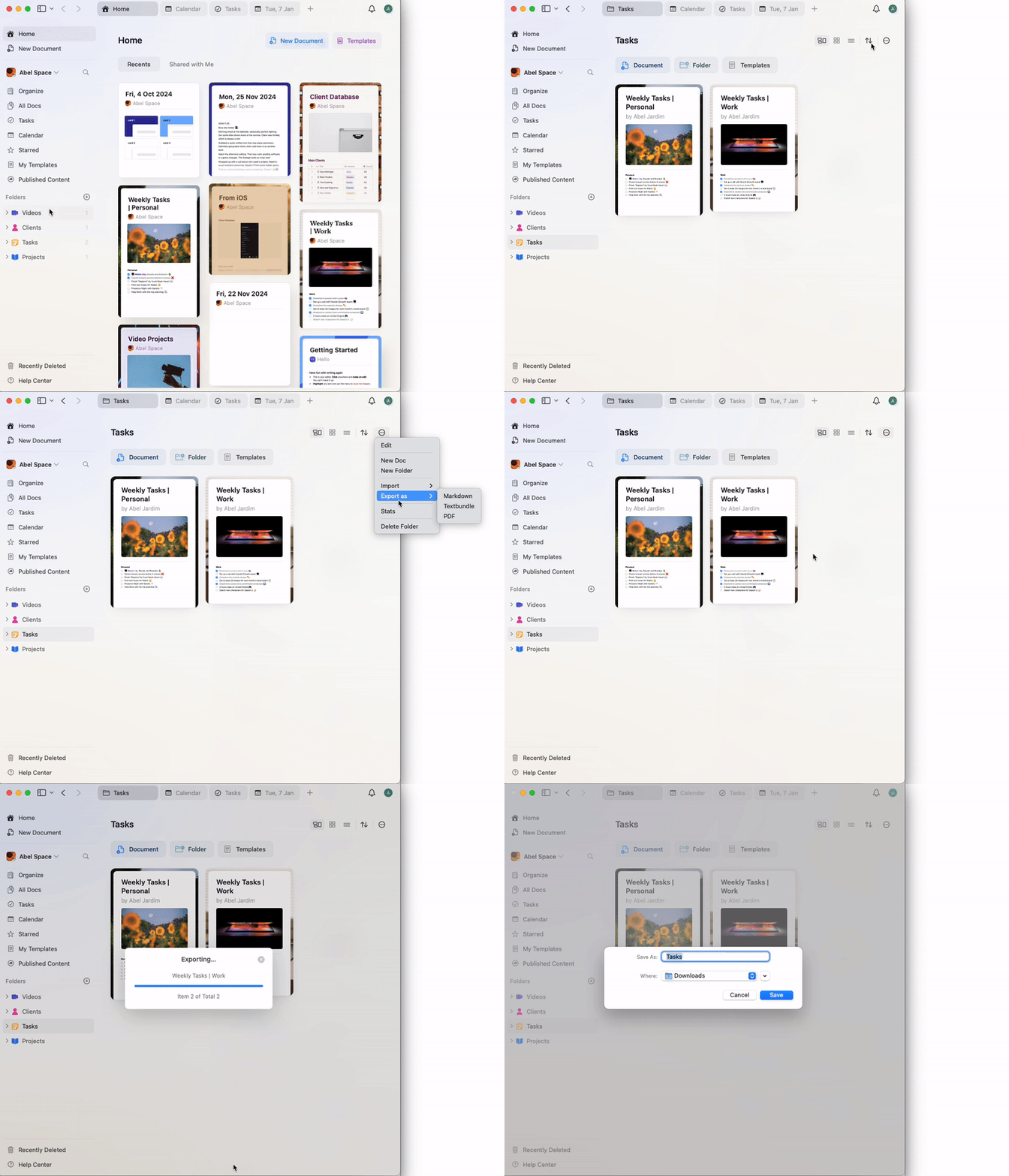 匯出將包含資料夾內的所有文件與子頁面。如遇到匯出問題,請確認應用程式已更新到最新版本,必要時可嘗試分批匯出較小的項目。