> ## Documentation Index
> Fetch the complete documentation index at: https://craft-support.mintlify.site/llms.txt
> Use this file to discover all available pages before exploring further.
# iOS 手勢
> 在 iPhone 和 iPad 上使用直覺手勢以更快地選取、調整縮排與導覽。
Craft 在 iOS 上提供直覺的手勢,讓您在手機或平板上撰寫與編輯的體驗更加自然且高效。這些手勢能幫助您更快速地完成工作,而無需四處搜尋選單。
## 滑動以選取區塊
透過向左或向右滑動即可快速選取任一區塊。這比輕觸選取圓圈更快,特別是在處理多個區塊時。
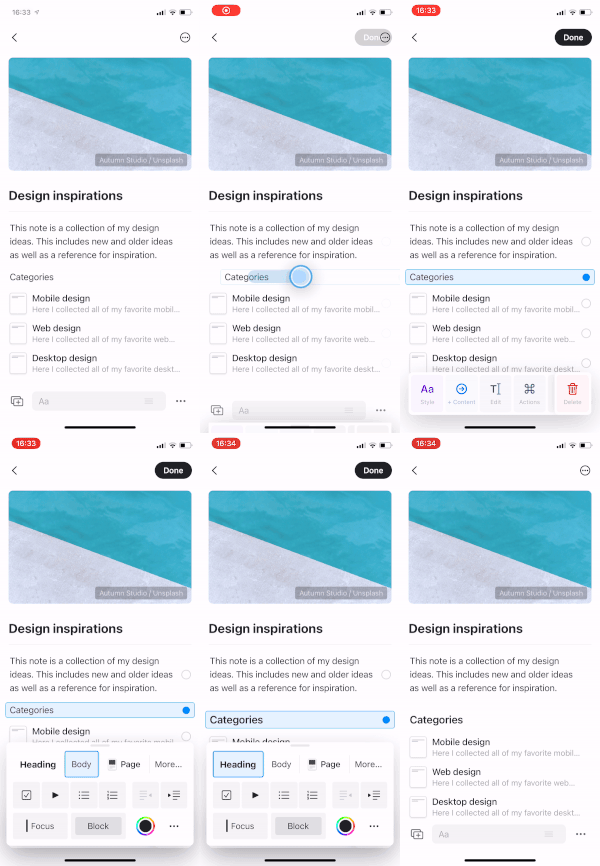 這個手勢在區塊的任何位置都有效 – 不需要特別對準某個按鈕。
## 選取多個區塊
選取一個區塊後,有兩種方法可以擴展選取範圍:
* **輕觸** 其他區塊上的選取圓圈,逐一加入選取
* **向上或向下滑動** 快速選取連續的區塊
這個手勢在區塊的任何位置都有效 – 不需要特別對準某個按鈕。
## 選取多個區塊
選取一個區塊後,有兩種方法可以擴展選取範圍:
* **輕觸** 其他區塊上的選取圓圈,逐一加入選取
* **向上或向下滑動** 快速選取連續的區塊
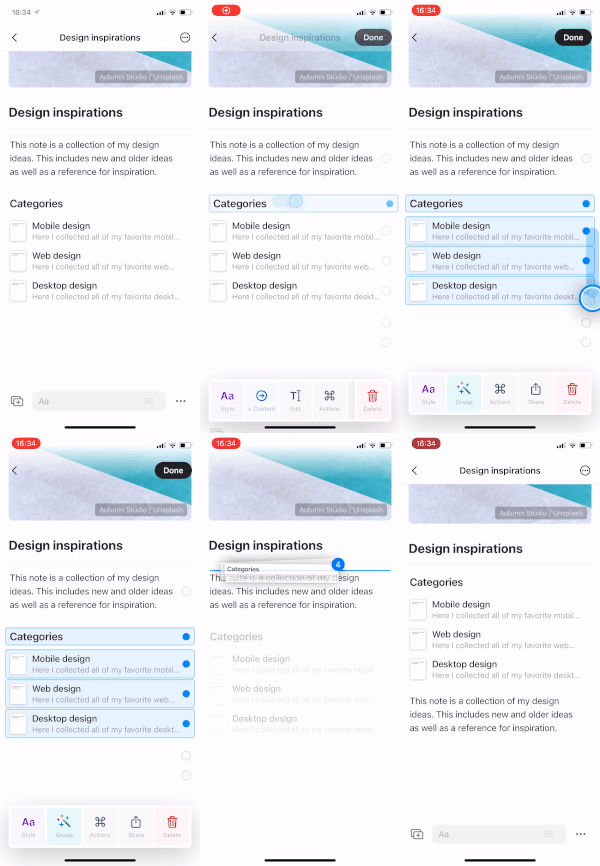 當您想移動、刪除或一次為多個區塊套用樣式時,這個功能特別有用。
## 滑動調整縮排
在編輯區塊時,向左或向右滑動可快速調整該區塊的縮排層級。當您正在輸入或編輯時均可使用。
當您想移動、刪除或一次為多個區塊套用樣式時,這個功能特別有用。
## 滑動調整縮排
在編輯區塊時,向左或向右滑動可快速調整該區塊的縮排層級。當您正在輸入或編輯時均可使用。
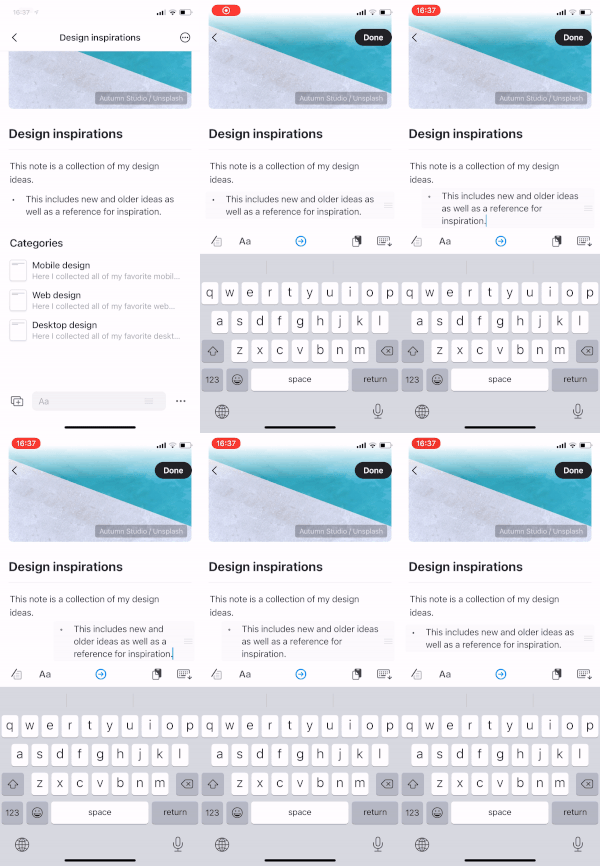 此手勢僅在區塊處於編輯模式(游標可見)時有效。它不同於滑動選取手勢,後者適用於區塊未被編輯時。
## 雙指輕觸開啟搜尋
在任何位置以兩指輕觸即可立刻開啟搜尋。此手勢在整個應用程式中都有效,讓您不需伸手按搜尋按鈕也能輕鬆找到內容或前往不同的文件。
此手勢僅在區塊處於編輯模式(游標可見)時有效。它不同於滑動選取手勢,後者適用於區塊未被編輯時。
## 雙指輕觸開啟搜尋
在任何位置以兩指輕觸即可立刻開啟搜尋。此手勢在整個應用程式中都有效,讓您不需伸手按搜尋按鈕也能輕鬆找到內容或前往不同的文件。
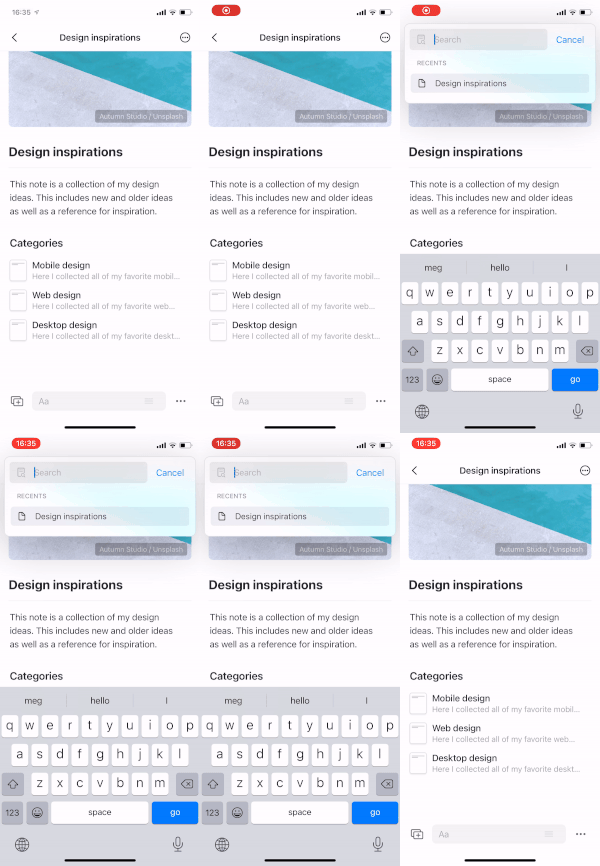 搜尋是 Craft 中最快速的導覽方式之一。使用這個手勢可以快速在文件間跳轉、查找特定內容或存取近期頁面。
## 其他 iOS 手勢
除了這些以編輯為主的手勢外,iOS 還支援:
* **在側邊欄的文件上向左滑動** 以顯示像是加星、分享和刪除的選項
* **在文件上向下拉** 以重新整理並同步最新變更
* **長按** 元素以顯示內容選單
這些手勢結合起來,打造出流暢且以行動裝置為先的編輯體驗,符合您使用 iPhone 或 iPad 的自然互動方式。
搜尋是 Craft 中最快速的導覽方式之一。使用這個手勢可以快速在文件間跳轉、查找特定內容或存取近期頁面。
## 其他 iOS 手勢
除了這些以編輯為主的手勢外,iOS 還支援:
* **在側邊欄的文件上向左滑動** 以顯示像是加星、分享和刪除的選項
* **在文件上向下拉** 以重新整理並同步最新變更
* **長按** 元素以顯示內容選單
這些手勢結合起來,打造出流暢且以行動裝置為先的編輯體驗,符合您使用 iPhone 或 iPad 的自然互動方式。