> ## Documentation Index
> Fetch the complete documentation index at: https://craft-support.mintlify.site/llms.txt
> Use this file to discover all available pages before exploring further.
# 下標與上標
> 透過內嵌公式或快捷鍵新增下標與上標格式。
您可以使用數學記法的快捷方式或內嵌公式功能,將下標與上標加入文字中。
## 使用快捷鍵
在文字中直接輸入下列內嵌公式:
* **下標**: `$$_2$$` (例如:H₂O 會是 `H$$_2$$O`)
* **上標**: `$$^2$$` (例如:x² 會是 `x$$^2$$`)
## 使用內嵌公式
您也可以使用內嵌公式功能來建立更複雜的下標與上標:
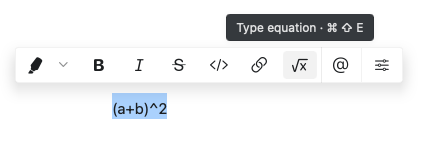 插入內嵌公式:
1. 輸入 `$` 兩次以開啟公式編輯器
2. 輸入您的數學記法(例如:下標使用 `_2`,上標使用 `^2`)
3. 再次輸入 `$` 兩次以關閉公式
Craft 使用 LaTeX 風格的數學記法來撰寫公式。這讓您在加入下標與上標的同時,也能輕鬆建立複雜的方程式。
插入內嵌公式:
1. 輸入 `$` 兩次以開啟公式編輯器
2. 輸入您的數學記法(例如:下標使用 `_2`,上標使用 `^2`)
3. 再次輸入 `$` 兩次以關閉公式
Craft 使用 LaTeX 風格的數學記法來撰寫公式。這讓您在加入下標與上標的同時,也能輕鬆建立複雜的方程式。