Craft Help Center home page
English
Search...
⌘K
Account & Billing
Overview
Profile Settings
Overview
Change Profile Photo
Change Account Name
Change Email Address
Rename Spaces
Languages
Login Code Issues
Custom App Icon
Multiple Accounts
Data and Security
Storage and Recovery
Subscription Plans
Billing
Help & Troubleshooting
Getting Help and Sharing Feedback
Troubleshooting
Craft Help Center home page
English
Search...
⌘K
Ask AI
Community
Submit a Request
Get Craft
Get Craft
Search...
Navigation
Profile Settings
Rename Spaces
Getting Started
Features
Integrations
Account & Support
Getting Started
Features
Integrations
Account & Support
Community
Submit a Request
Get Craft
On this page
Rename a Space
Switch Between Spaces
Profile Settings
Rename Spaces
Change the name of your spaces to better organize your content.
Spaces in Craft help you organize content and collaborate effectively. You can rename any space you own or have admin access to.
Rename a Space
1
Select
Settings
2
Click
Space Settings
3
Update the
space name
field
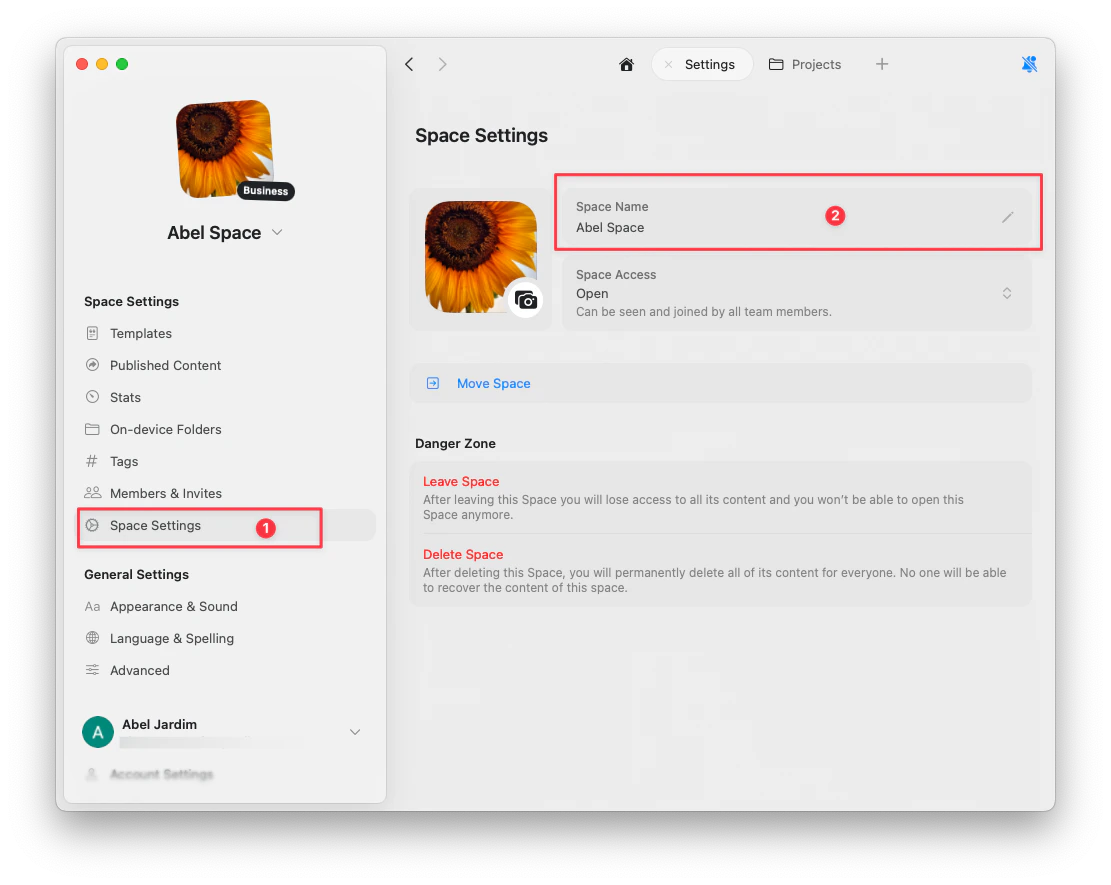
Changes are saved automatically.
Switch Between Spaces
macOS
iOS
Web
Click the
space dropdown
in the top left to switch between your spaces.
Tap the
space name
in the top left to open the space switcher.
Click the
space dropdown
in the top left to switch between your spaces.
Change Email Address
Languages
⌘I