

Requires iOS 27, iPadOS 27, or macOS 27. These capabilities are part of Apple’s updated Siri, so availability also depends on your device, region, and Siri language. See Availability below.
What Siri Can Do
With documents:- Find and open a document (“Open my packing list in Craft”)
- Answer questions from a document’s content (“What are my plans for my Tokyo trip?”)
- Create a new document with a title and content
- Add text to the end of an existing document
- Rename a document, star it, or move it to a folder
- Find and list your scheduled tasks
- Create new tasks
- Complete, update, or delete tasks
Working with Tasks
In Craft, every task belongs to a Space. Siri organizes reminders into lists, so each of your Spaces appears in Siri as a list with the same name: the tasks in your “Work” Space make up a list called “Work” in Siri. When you create a task without naming a list, Craft uses your Space automatically if only one Space is available. If multiple Spaces are available, Siri asks which Space to use. Reply with the Space name. You can also name the Space in your request, using the word “list”:“In my Craft ‘My Life’ list, create a reminder to book flights for Friday”
How Siri Reads Your Content
Craft shares your content with Siri through the same on-device index that powers Spotlight. The index is built when you first use Craft on the device and then updated as you make changes. Your 50 most recently edited documents share their content, so Siri can read them and answer questions about them. Only the first level of a document is included; content nested deeper, such as sub-pages, is not shared. All other documents share their title and details like folder and dates, so Siri can still find and open them, but it cannot read their content. If Siri can’t read a document you need, open and edit it in Craft. Recently edited documents move into the group that shares content.Limitations
Spaces
For documents, Siri works with the Space you used most recently in Craft, and you can’t ask it to switch. To use Siri with a different Space, open that Space in Craft first. For tasks, each Space appears as its own list, so you can direct a request at any Space by naming it.Tasks
Siri only sees tasks that have a schedule or deadline date. Checkboxes without a date in your documents are not shared as reminders.Editing
Siri can add text to the end of a document and change its title, starred state, or folder. It cannot rewrite, reorganize, or delete existing content. For those edits, use the app or Craft Assistant.Formatting
Siri works with plain text in both directions. When it reads a document, formatting is not included. When it writes, formatting instructions come through as plain characters, so asking for bold text or bullet points produces** and - symbols instead of formatted content.
Availability
These Siri capabilities follow Apple’s regional rollout, which Craft doesn’t control:- iPhone and iPad: Apple has not made these Siri capabilities available in the EU. Outside the EU they work with a supported Siri language.
- Mac: These capabilities require Apple’s updated Siri, which Apple currently ships as a beta. Availability in the EU differs from iOS and may depend on your configuration.
Troubleshooting
Siri finds a document but can't tell me what's in it
Siri finds a document but can't tell me what's in it
Only your 50 most recently edited documents share their content with Siri, and only the first level of each document is included. Open and edit the document in Craft, give the index a moment to update, then ask again.
Creating or completing a task fails with Something went wrong
Creating or completing a task fails with Something went wrong
Name the Space in your request, using the word “list”, and start a new Siri conversation when you retry.When creating a task without a list name, Craft uses the only available Space or asks which Space to use if there are several. Reply with the Space name if prompted. Asking Siri which lists you have can still fail, and Siri’s responses can be inconsistent. Check that Craft is up to date, since older versions can fail when the list name is omitted.
Siri on Mac doesn't respond to Craft requests
Siri on Mac doesn't respond to Craft requests
These capabilities require Apple’s updated Siri, which is a beta on macOS. You can tell which version you have by the Siri icon: the older Siri has a colorful icon, the updated Siri has a monochrome one. To switch, open System Settings → Siri and turn on the updated Siri.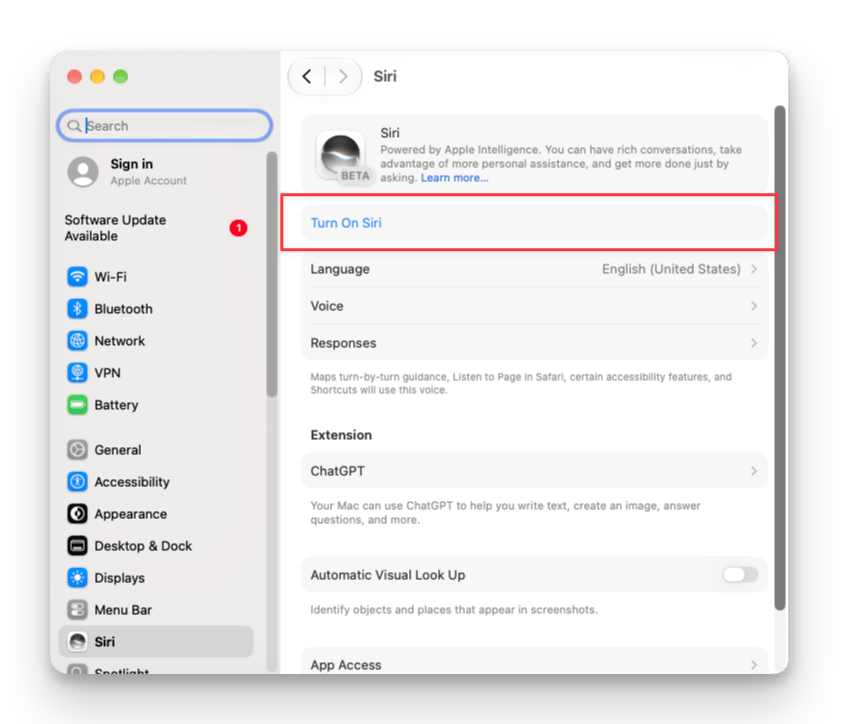
Siri created a document in the wrong Space
Siri created a document in the wrong Space
Siri always uses the Space you most recently used in Craft. Open the Space you want in the app, then repeat the request.
Siri says it can only edit the open document
Siri says it can only edit the open document
Siri’s editing is limited to appending text and changing a document’s title, starred state, or folder. Requests outside that range can produce inconsistent responses from Siri itself.
Bold text or bullet points show up as ** and - characters
Bold text or bullet points show up as ** and - characters
Siri writes plain text only. Formatting requests are not supported in the current version.
Related Articles
Apple Shortcuts
Build custom automations and run them with Siri
Craft Assistant
Craft’s built-in AI for editing and answering questions in the app