

The Slash Command Menu
Press/ while editing or with blocks selected to open the command menu. Start typing to filter for the desired style or action.
Learn more about the slash menu.
Markdown Formatting
Craft supports the full suite of markdown formatting options. For example, type**bold text** and it will appear as bold text.
See the complete list of markdown shortcuts.
Keyboard Shortcuts
Craft supports over 75 keyboard shortcuts across all platforms. Hover over buttons to see their shortcuts - here are some favorites:Cmd +/Ctrl +to increase text sizeCmd -/Ctrl -to decrease text sizeCmd B/Ctrl Bfor boldCmd I/Ctrl Ifor italicTabto increase indentShift Tabto decrease indent
On Mac, click the question mark button in the bottom right corner to see all available shortcuts. On other platforms, hover over toolbar buttons to reveal their keyboard shortcuts.
Indent Depth Limit
Craft supports up to 5 levels of indentation for lists and nested content. This limit ensures documents remain readable and perform well across all devices, especially on mobile.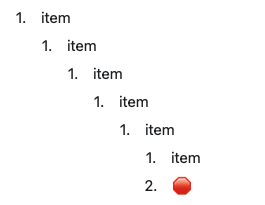
- Breaking content into separate documents with links between them
- Using Collections for deeply structured data
- Creating subpages within a parent document
Choosing Your Method
- Slash menu - Great for discovering features and formatting options
- Markdown - Fast for those familiar with markdown syntax
- Keyboard shortcuts - Most efficient once memorized for frequently used actions